Testing
Overview
Go ships with a powerful testing framework. Tests in Go are written in the Go language, so there is no need to learn another syntax. This chapter will explore basic tests, table driven tests, and sub-tests. Concepts such as race conditions, code coverage, test automation. Understanding test options such as parallel, short testing, timing out tests, and verbose are also covered.
Testing
Testing in Go is easy, and simple to use. There is strong emphasis on testing in Go. The compiler will catch a lot of bugs for you, but it can not ensure your business logic is sound or bug-free.
Naming
Naming of files and functions play an incredibly important part of how tests work in Go.
Test Files
Test files in Go live next to the files that they are going to be testing.
foo.go
foo_test.go
They are identified by having the suffix _test.go. This is a required
naming pattern by Go.
Simple Test
Tests must be in a *_test.go file and must be named in the following format:
Test<Name>(*testing.T)
func TestSimple(t *testing.T) {
	if true {
		t.Error("expected false, got true")
	}
}
package src

import "testing"

// section: test
func TestSimple(t *testing.T) {
	if true {
		t.Error("expected false, got true")
	}
}

// section: test

/* output
// section: output
--- FAIL: TestSimple (0.00s)
 simple_test.go:7: expected false, got true
FAIL
// section: output
*/
--- FAIL: TestSimple (0.00s)
 simple_test.go:7: expected false, got true
FAILpackage src
import "testing"
// section: test
func TestSimple(t *testing.T) {
if true {
t.Error("expected false, got true")
}
}
// section: test
/* output
// section: output
--- FAIL: TestSimple (0.00s)
simple_test.go:7: expected false, got true
FAIL
// section: output
*/`*testing.T`
The *testing.T type has the following methods available for us to use to control the flow of a test.
Attr(key, value string)          // Go 1.25+
Chdir(dir string)                // Go 1.24+
Cleanup(f func())
Context() context.Context        // Go 1.24+
Deadline() (deadline time.Time, ok bool)
Error(args ...any)
Errorf(format string, args ...any)
Fail()
FailNow()
Failed() bool
Fatal(args ...any)
Fatalf(format string, args ...any)
Helper()
Log(args ...any)
Logf(format string, args ...any)
Name() string
Output() io.Writer               // Go 1.25+
Parallel()
Run(name string, f func(t *T)) bool
Setenv(key, value string)
Skip(args ...any)
SkipNow()
Skipf(format string, args ...any)
Skipped() bool
TempDir() string
Error Vs. Fatal
Two of the most common calls to make while testing are Error and Fatal. They both report a test failure, but Error will continue with test execution, where Fatal will end the test.
It is common to use Fatal when the condition being tested failing would result in the rest of the test failing or having invalid conditions.
Example
func TestNewObject(t *testing.T) {
	obj, err := newObject()
	if err != nil {
		// We need to fatal and end the tests, as `obj` is now `nil` and future
		// tests would panic or fail
		t.Fatal(err)
	}
	// continue with more tests
	fmt.Println(obj)
}
package src

import (
	"errors"
	"fmt"
	"testing"
)

// section: test
func TestNewObject(t *testing.T) {
	obj, err := newObject()
	if err != nil {
		// We need to fatal and end the tests, as `obj` is now `nil` and future
		// tests would panic or fail
		t.Fatal(err)
	}
	// continue with more tests
	fmt.Println(obj)
}

// section: test

// supporting code for above test

type object struct{}

func newObject() (*object, error) {
	return nil, errors.New("error creating object")
}Crafting Good Test Failure Messages
When you decide that a test has failed you need to make sure to craft a well written failure message that informs the person running the test what the failure was and why. This failure message should also be resilient to change in the test later.
Take the following test and its resulting output. The output gives us no indication of why the test fails.
func TestAddTen(t *testing.T) {
	v := math.AddTen(1)
	if v != 11 {
		t.Fatal("unexpected value")
	}
}
package math_test

import (
	"testing"

	"github.com/gopherguides/learn/_training/fundamentals/testing/src/math"
)

// section: bad
func TestAddTen(t *testing.T) {
	v := math.AddTen(1)
	if v != 11 {
		t.Fatal("unexpected value")
	}
}

// section: bad

/*
// section: bad-output
--- FAIL: TestAddTen (0.00s)
	math_test.go:13: unexpected value
// section: bad-output
*/

// section: better
func TestAddTen_Better(t *testing.T) {
	v := math.AddTen(1)
	if v != 11 {
		t.Fatalf("unexpected value, got %d", v)
	}
}

// section: better

/*
// section: better-output
--- FAIL: TestAddTen_Better (0.00s)
	math_test.go:33: unexpected value, got 12
// section: better-output
*/

// section: better-yet
func TestAddTen_BetterYet(t *testing.T) {
	v := math.AddTen(1)
	if v != 11 {
		t.Fatalf("unexpected value, got: %d, exp %d", v, 11)
	}
}

// section: better-yet

/*
// section: better-yet-output
--- FAIL: TestAddTen_BetterYet (0.00s)
	math_test.go:33: unexpected value, got 12, exp: 11
// section: better-yet-output
*/

// section: best
func TestAddTen_Best(t *testing.T) {
	got := math.AddTen(1)
	exp := 11
	if got != exp {
		t.Fatalf("unexpected value, got: %d, exp %d", got, exp)
	}
}

// section: best

/*
// section: best-output
--- FAIL: TestAddTen_Best (0.00s)
	math_test.go:42: unexpected value, got 12, exp: 11
// section: best-output
*/

// section: best-condensed
func TestAddTen_Best(t *testing.T) {
	if got, exp := math.AddTen(1), 11; got != exp {
		t.Fatalf("unexpected value, got: %d, exp %d", got, exp)
	}
}

// section: best-condensed
--- FAIL: TestAddTen (0.00s)
math_test.go:13: unexpected valuepackage math_test
import (
"testing"
"github.com/gopherguides/learn/_training/fundamentals/testing/src/math"
)
// section: bad
func TestAddTen(t *testing.T) {
v := math.AddTen(1)
if v != 11 {
t.Fatal("unexpected value")
}
}
// section: bad
/*
// section: bad-output
--- FAIL: TestAddTen (0.00s)
math_test.go:13: unexpected value
// section: bad-output
*/
// section: better
func TestAddTen_Better(t *testing.T) {
v := math.AddTen(1)
if v != 11 {
t.Fatalf("unexpected value, got %d", v)
}
}
// section: better
/*
// section: better-output
--- FAIL: TestAddTen_Better (0.00s)
math_test.go:33: unexpected value, got 12
// section: better-output
*/
// section: better-yet
func TestAddTen_BetterYet(t *testing.T) {
v := math.AddTen(1)
if v != 11 {
t.Fatalf("unexpected value, got: %d, exp %d", v, 11)
}
}
// section: better-yet
/*
// section: better-yet-output
--- FAIL: TestAddTen_BetterYet (0.00s)
math_test.go:33: unexpected value, got 12, exp: 11
// section: better-yet-output
*/
// section: best
func TestAddTen_Best(t *testing.T) {
got := math.AddTen(1)
exp := 11
if got != exp {
t.Fatalf("unexpected value, got: %d, exp %d", got, exp)
}
}
// section: best
/*
// section: best-output
--- FAIL: TestAddTen_Best (0.00s)
math_test.go:42: unexpected value, got 12, exp: 11
// section: best-output
*/
// section: best-condensed
func TestAddTen_Best(t *testing.T) {
if got, exp := math.AddTen(1), 11; got != exp {
t.Fatalf("unexpected value, got: %d, exp %d", got, exp)
}
}
// section: best-condensedA Better Failure Message
A better version of the failure message would include more information about the test results.
func TestAddTen_Better(t *testing.T) {
v := math.AddTen(1)
if v != 11 {
t.Fatalf("unexpected value, got %d", v)
}
}
package math_test

import (
	"testing"

	"github.com/gopherguides/learn/_training/fundamentals/testing/src/math"
)

// section: bad
func TestAddTen(t *testing.T) {
	v := math.AddTen(1)
	if v != 11 {
		t.Fatal("unexpected value")
	}
}

// section: bad

/*
// section: bad-output
--- FAIL: TestAddTen (0.00s)
	math_test.go:13: unexpected value
// section: bad-output
*/

// section: better
func TestAddTen_Better(t *testing.T) {
	v := math.AddTen(1)
	if v != 11 {
		t.Fatalf("unexpected value, got %d", v)
	}
}

// section: better

/*
// section: better-output
--- FAIL: TestAddTen_Better (0.00s)
	math_test.go:33: unexpected value, got 12
// section: better-output
*/

// section: better-yet
func TestAddTen_BetterYet(t *testing.T) {
	v := math.AddTen(1)
	if v != 11 {
		t.Fatalf("unexpected value, got: %d, exp %d", v, 11)
	}
}

// section: better-yet

/*
// section: better-yet-output
--- FAIL: TestAddTen_BetterYet (0.00s)
	math_test.go:33: unexpected value, got 12, exp: 11
// section: better-yet-output
*/

// section: best
func TestAddTen_Best(t *testing.T) {
	got := math.AddTen(1)
	exp := 11
	if got != exp {
		t.Fatalf("unexpected value, got: %d, exp %d", got, exp)
	}
}

// section: best

/*
// section: best-output
--- FAIL: TestAddTen_Best (0.00s)
	math_test.go:42: unexpected value, got 12, exp: 11
// section: best-output
*/

// section: best-condensed
func TestAddTen_Best(t *testing.T) {
	if got, exp := math.AddTen(1), 11; got != exp {
		t.Fatalf("unexpected value, got: %d, exp %d", got, exp)
	}
}

// section: best-condensed
--- FAIL: TestAddTen_Better (0.00s)
math_test.go:33: unexpected value, got 12package math_test
import (
"testing"
"github.com/gopherguides/learn/_training/fundamentals/testing/src/math"
)
// section: bad
func TestAddTen(t *testing.T) {
v := math.AddTen(1)
if v != 11 {
t.Fatal("unexpected value")
}
}
// section: bad
/*
// section: bad-output
--- FAIL: TestAddTen (0.00s)
math_test.go:13: unexpected value
// section: bad-output
*/
// section: better
func TestAddTen_Better(t *testing.T) {
	v := math.AddTen(1)
	if v != 11 {
		t.Fatalf("unexpected value, got %d", v)
	}
}
// section: better
/*
// section: better-output
--- FAIL: TestAddTen_Better (0.00s)
math_test.go:33: unexpected value, got 12
// section: better-output
*/
// section: better-yet
func TestAddTen_BetterYet(t *testing.T) {
v := math.AddTen(1)
if v != 11 {
t.Fatalf("unexpected value, got: %d, exp %d", v, 11)
}
}
// section: better-yet
/*
// section: better-yet-output
--- FAIL: TestAddTen_BetterYet (0.00s)
math_test.go:33: unexpected value, got 12, exp: 11
// section: better-yet-output
*/
// section: best
func TestAddTen_Best(t *testing.T) {
got := math.AddTen(1)
exp := 11
if got != exp {
t.Fatalf("unexpected value, got: %d, exp %d", got, exp)
}
}
// section: best
/*
// section: best-output
--- FAIL: TestAddTen_Best (0.00s)
math_test.go:42: unexpected value, got 12, exp: 11
// section: best-output
*/
// section: best-condensed
func TestAddTen_Best(t *testing.T) {
if got, exp := math.AddTen(1), 11; got != exp {
t.Fatalf("unexpected value, got: %d, exp %d", got, exp)
}
}
// section: best-condensedBetter Yet...
An even better version of the failure message would include more information about how and why the test failed.
func TestAddTen_BetterYet(t *testing.T) {
v := math.AddTen(1)
if v != 11 {
t.Fatalf("unexpected value, got: %d, exp %d", v, 11)
}
}
package math_test

import (
	"testing"

	"github.com/gopherguides/learn/_training/fundamentals/testing/src/math"
)

// section: bad
func TestAddTen(t *testing.T) {
	v := math.AddTen(1)
	if v != 11 {
		t.Fatal("unexpected value")
	}
}

// section: bad

/*
// section: bad-output
--- FAIL: TestAddTen (0.00s)
	math_test.go:13: unexpected value
// section: bad-output
*/

// section: better
func TestAddTen_Better(t *testing.T) {
	v := math.AddTen(1)
	if v != 11 {
		t.Fatalf("unexpected value, got %d", v)
	}
}

// section: better

/*
// section: better-output
--- FAIL: TestAddTen_Better (0.00s)
	math_test.go:33: unexpected value, got 12
// section: better-output
*/

// section: better-yet
func TestAddTen_BetterYet(t *testing.T) {
	v := math.AddTen(1)
	if v != 11 {
		t.Fatalf("unexpected value, got: %d, exp %d", v, 11)
	}
}

// section: better-yet

/*
// section: better-yet-output
--- FAIL: TestAddTen_BetterYet (0.00s)
	math_test.go:33: unexpected value, got 12, exp: 11
// section: better-yet-output
*/

// section: best
func TestAddTen_Best(t *testing.T) {
	got := math.AddTen(1)
	exp := 11
	if got != exp {
		t.Fatalf("unexpected value, got: %d, exp %d", got, exp)
	}
}

// section: best

/*
// section: best-output
--- FAIL: TestAddTen_Best (0.00s)
	math_test.go:42: unexpected value, got 12, exp: 11
// section: best-output
*/

// section: best-condensed
func TestAddTen_Best(t *testing.T) {
	if got, exp := math.AddTen(1), 11; got != exp {
		t.Fatalf("unexpected value, got: %d, exp %d", got, exp)
	}
}

// section: best-condensed
--- FAIL: TestAddTen_BetterYet (0.00s)
math_test.go:33: unexpected value, got 12, exp: 11package math_test
import (
"testing"
"github.com/gopherguides/learn/_training/fundamentals/testing/src/math"
)
// section: bad
func TestAddTen(t *testing.T) {
v := math.AddTen(1)
if v != 11 {
t.Fatal("unexpected value")
}
}
// section: bad
/*
// section: bad-output
--- FAIL: TestAddTen (0.00s)
math_test.go:13: unexpected value
// section: bad-output
*/
// section: better
func TestAddTen_Better(t *testing.T) {
v := math.AddTen(1)
if v != 11 {
t.Fatalf("unexpected value, got %d", v)
}
}
// section: better
/*
// section: better-output
--- FAIL: TestAddTen_Better (0.00s)
	math_test.go:33: unexpected value, got 12
// section: better-output
*/
// section: better-yet
func TestAddTen_BetterYet(t *testing.T) {
v := math.AddTen(1)
if v != 11 {
t.Fatalf("unexpected value, got: %d, exp %d", v, 11)
}
}
// section: better-yet
/*
// section: better-yet-output
--- FAIL: TestAddTen_BetterYet (0.00s)
math_test.go:33: unexpected value, got 12, exp: 11
// section: better-yet-output
*/
// section: best
func TestAddTen_Best(t *testing.T) {
got := math.AddTen(1)
exp := 11
if got != exp {
t.Fatalf("unexpected value, got: %d, exp %d", got, exp)
}
}
// section: best
/*
// section: best-output
--- FAIL: TestAddTen_Best (0.00s)
math_test.go:42: unexpected value, got 12, exp: 11
// section: best-output
*/
// section: best-condensed
func TestAddTen_Best(t *testing.T) {
if got, exp := math.AddTen(1), 11; got != exp {
t.Fatalf("unexpected value, got: %d, exp %d", got, exp)
}
}
// section: best-condensedThe Best Failure Message
The best failure messages not only include information about how and why the test failed, but they are resilient to changes within the tests.
func TestAddTen_BetterYet(t *testing.T) {
v := math.AddTen(1)
if v != 11 {
t.Fatalf("unexpected value, got: %d, exp %d", v, 11)
}
}
package math_test

import (
	"testing"

	"github.com/gopherguides/learn/_training/fundamentals/testing/src/math"
)

// section: bad
func TestAddTen(t *testing.T) {
	v := math.AddTen(1)
	if v != 11 {
		t.Fatal("unexpected value")
	}
}

// section: bad

/*
// section: bad-output
--- FAIL: TestAddTen (0.00s)
	math_test.go:13: unexpected value
// section: bad-output
*/

// section: better
func TestAddTen_Better(t *testing.T) {
	v := math.AddTen(1)
	if v != 11 {
		t.Fatalf("unexpected value, got %d", v)
	}
}

// section: better

/*
// section: better-output
--- FAIL: TestAddTen_Better (0.00s)
	math_test.go:33: unexpected value, got 12
// section: better-output
*/

// section: better-yet
func TestAddTen_BetterYet(t *testing.T) {
	v := math.AddTen(1)
	if v != 11 {
		t.Fatalf("unexpected value, got: %d, exp %d", v, 11)
	}
}

// section: better-yet

/*
// section: better-yet-output
--- FAIL: TestAddTen_BetterYet (0.00s)
	math_test.go:33: unexpected value, got 12, exp: 11
// section: better-yet-output
*/

// section: best
func TestAddTen_Best(t *testing.T) {
	got := math.AddTen(1)
	exp := 11
	if got != exp {
		t.Fatalf("unexpected value, got: %d, exp %d", got, exp)
	}
}

// section: best

/*
// section: best-output
--- FAIL: TestAddTen_Best (0.00s)
	math_test.go:42: unexpected value, got 12, exp: 11
// section: best-output
*/

// section: best-condensed
func TestAddTen_Best(t *testing.T) {
	if got, exp := math.AddTen(1), 11; got != exp {
		t.Fatalf("unexpected value, got: %d, exp %d", got, exp)
	}
}

// section: best-condensedWhile this error message is very well written we have hard coded the expected value in two places. Should we update one and forget to update the other, then the resulting output would be very confusing.
By using variables to hold data, like the expected value, we can easily update the code in one place and know that our error messages will be updated accordingly.
func TestAddTen_Best(t *testing.T) {
got := math.AddTen(1)
exp := 11
if got != exp {
t.Fatalf("unexpected value, got: %d, exp %d", got, exp)
}
}
package math_test
import (
"testing"
"github.com/gopherguides/learn/_training/fundamentals/testing/src/math"
)
// section: bad
func TestAddTen(t *testing.T) {
v := math.AddTen(1)
if v != 11 {
t.Fatal("unexpected value")
}
}
// section: bad
/*
// section: bad-output
--- FAIL: TestAddTen (0.00s)
math_test.go:13: unexpected value
// section: bad-output
*/
// section: better
func TestAddTen_Better(t *testing.T) {
v := math.AddTen(1)
if v != 11 {
t.Fatalf("unexpected value, got %d", v)
}
}
// section: better
/*
// section: better-output
--- FAIL: TestAddTen_Better (0.00s)
math_test.go:33: unexpected value, got 12
// section: better-output
*/
// section: better-yet
func TestAddTen_BetterYet(t *testing.T) {
	v := math.AddTen(1)
	if v != 11 {
		t.Fatalf("unexpected value, got: %d, exp %d", v, 11)
	}
}
// section: better-yet
/*
// section: better-yet-output
--- FAIL: TestAddTen_BetterYet (0.00s)
math_test.go:33: unexpected value, got 12, exp: 11
// section: better-yet-output
*/
// section: best
func TestAddTen_Best(t *testing.T) {
got := math.AddTen(1)
exp := 11
if got != exp {
t.Fatalf("unexpected value, got: %d, exp %d", got, exp)
}
}
// section: best
/*
// section: best-output
--- FAIL: TestAddTen_Best (0.00s)
math_test.go:42: unexpected value, got 12, exp: 11
// section: best-output
*/
// section: best-condensed
func TestAddTen_Best(t *testing.T) {
if got, exp := math.AddTen(1), 11; got != exp {
t.Fatalf("unexpected value, got: %d, exp %d", got, exp)
}
}
// section: best-condensed
--- FAIL: TestAddTen_Best (0.00s)
math_test.go:42: unexpected value, got 12, exp: 11package math_test
import (
"testing"
"github.com/gopherguides/learn/_training/fundamentals/testing/src/math"
)
// section: bad
func TestAddTen(t *testing.T) {
v := math.AddTen(1)
if v != 11 {
t.Fatal("unexpected value")
}
}
// section: bad
/*
// section: bad-output
--- FAIL: TestAddTen (0.00s)
math_test.go:13: unexpected value
// section: bad-output
*/
// section: better
func TestAddTen_Better(t *testing.T) {
v := math.AddTen(1)
if v != 11 {
t.Fatalf("unexpected value, got %d", v)
}
}
// section: better
/*
// section: better-output
--- FAIL: TestAddTen_Better (0.00s)
math_test.go:33: unexpected value, got 12
// section: better-output
*/
// section: better-yet
func TestAddTen_BetterYet(t *testing.T) {
v := math.AddTen(1)
if v != 11 {
t.Fatalf("unexpected value, got: %d, exp %d", v, 11)
}
}
// section: better-yet
/*
// section: better-yet-output
--- FAIL: TestAddTen_BetterYet (0.00s)
math_test.go:33: unexpected value, got 12, exp: 11
// section: better-yet-output
*/
// section: best
func TestAddTen_Best(t *testing.T) {
got := math.AddTen(1)
exp := 11
if got != exp {
t.Fatalf("unexpected value, got: %d, exp %d", got, exp)
}
}
// section: best
/*
// section: best-output
--- FAIL: TestAddTen_Best (0.00s)
math_test.go:42: unexpected value, got 12, exp: 11
// section: best-output
*/
// section: best-condensed
func TestAddTen_Best(t *testing.T) {
if got, exp := math.AddTen(1), 11; got != exp {
t.Fatalf("unexpected value, got: %d, exp %d", got, exp)
}
}
// section: best-condensedThis can be condensed to a single inline if statement as well:
func TestAddTen_Best(t *testing.T) {
if got, exp := math.AddTen(1), 11; got != exp {
t.Fatalf("unexpected value, got: %d, exp %d", got, exp)
}
}
package math_test

import (
	"testing"

	"github.com/gopherguides/learn/_training/fundamentals/testing/src/math"
)

// section: bad
func TestAddTen(t *testing.T) {
	v := math.AddTen(1)
	if v != 11 {
		t.Fatal("unexpected value")
	}
}

// section: bad

/*
// section: bad-output
--- FAIL: TestAddTen (0.00s)
	math_test.go:13: unexpected value
// section: bad-output
*/

// section: better
func TestAddTen_Better(t *testing.T) {
	v := math.AddTen(1)
	if v != 11 {
		t.Fatalf("unexpected value, got %d", v)
	}
}

// section: better

/*
// section: better-output
--- FAIL: TestAddTen_Better (0.00s)
	math_test.go:33: unexpected value, got 12
// section: better-output
*/

// section: better-yet
func TestAddTen_BetterYet(t *testing.T) {
	v := math.AddTen(1)
	if v != 11 {
		t.Fatalf("unexpected value, got: %d, exp %d", v, 11)
	}
}

// section: better-yet

/*
// section: better-yet-output
--- FAIL: TestAddTen_BetterYet (0.00s)
	math_test.go:33: unexpected value, got 12, exp: 11
// section: better-yet-output
*/

// section: best
func TestAddTen_Best(t *testing.T) {
	got := math.AddTen(1)
	exp := 11
	if got != exp {
		t.Fatalf("unexpected value, got: %d, exp %d", got, exp)
	}
}

// section: best

/*
// section: best-output
--- FAIL: TestAddTen_Best (0.00s)
	math_test.go:42: unexpected value, got 12, exp: 11
// section: best-output
*/

// section: best-condensed
func TestAddTen_Best(t *testing.T) {
	if got, exp := math.AddTen(1), 11; got != exp {
		t.Fatalf("unexpected value, got: %d, exp %d", got, exp)
	}
}

// section: best-condensedTable Driven Tests
The testing system in Go does not allow for writing custom setup and teardown functions that can be run before/after each test.
To work around this, several testing styles have appeared in the Go community, the first of which is known as “table driven tests”.
func TestTableDriven(t *testing.T) {
	tt := []struct {
		A        int
		B        int
		Expected int
	}{
		{A: 1, B: 1, Expected: 2},
		{A: 2, B: 2, Expected: 4},
		{A: 3, B: 3, Expected: 5},
		{A: 4, B: 4, Expected: 6},
	}

	globalSetup()          // run necessary setup for all the tests
	defer globalTeardown() // make sure tearing down of all the tests

	for _, x := range tt {
		setup() // run necessary setup for the test

		got := x.A + x.B
		if got != x.Expected {
			t.Errorf("expected %d, got %d", x.Expected, got)
		}

		teardown() // run necessary teardown of the test
	}
}
package src

import "testing"

// section: test
func TestTableDriven(t *testing.T) {
	tt := []struct {
		A        int
		B        int
		Expected int
	}{
		{A: 1, B: 1, Expected: 2},
		{A: 2, B: 2, Expected: 4},
		{A: 3, B: 3, Expected: 5},
		{A: 4, B: 4, Expected: 6},
	}

	globalSetup()          // run necessary setup for all the tests
	defer globalTeardown() // make sure tearing down of all the tests

	for _, x := range tt {
		setup() // run necessary setup for the test

		got := x.A + x.B
		if got != x.Expected {
			t.Errorf("expected %d, got %d", x.Expected, got)
		}

		teardown() // run necessary teardown of the test
	}
}

// section: test

func globalSetup()    {}
func globalTeardown() {}
func setup()          {}
func teardown()       {}

/*
// section: test-output
--- FAIL: TestTableDriven (0.00s)
 table_driven_test.go:20: expected 5, got 6
 table_driven_test.go:20: expected 6, got 8
// section: test-output
*/
--- FAIL: TestTableDriven (0.00s)
 table_driven_test.go:20: expected 5, got 6
table_driven_test.go:20: expected 6, got 8package src
import "testing"
// section: test
func TestTableDriven(t *testing.T) {
tt := []struct {
A int
B int
Expected int
}{
{A: 1, B: 1, Expected: 2},
{A: 2, B: 2, Expected: 4},
{A: 3, B: 3, Expected: 5},
{A: 4, B: 4, Expected: 6},
}
globalSetup() // run necessary setup for all the tests
defer globalTeardown() // make sure tearing down of all the tests
for _, x := range tt {
setup() // run necessary setup for the test
got := x.A + x.B
if got != x.Expected {
t.Errorf("expected %d, got %d", x.Expected, got)
}
teardown() // run necessary teardown of the test
}
}
// section: test
func globalSetup() {}
func globalTeardown() {}
func setup() {}
func teardown() {}
/*
// section: test-output
--- FAIL: TestTableDriven (0.00s)
table_driven_test.go:20: expected 5, got 6
table_driven_test.go:20: expected 6, got 8
// section: test-output
*/Sub Tests
One of the short comings with table driven tests is it can often be confusing as to which test was the failing test. It is also difficult to run just a single test in the loop.
In Go 1.7 the ability to run “sub tests” were added to address these issues.
func TestSub(t *testing.T) {
	tt := []struct {
		A        int
		B        int
		Expected int
	}{
		{A: 1, B: 1, Expected: 2},
		{A: 2, B: 2, Expected: 4},
		{A: 3, B: 3, Expected: 5},
		{A: 4, B: 4, Expected: 6},
	}

	globalSetup()          // run necessary setup for all the tests
	defer globalTeardown() // make sure tearing down of all the tests

	for i, x := range tt {
		t.Run(fmt.Sprintf("sub test (%d)", i), func(st *testing.T) {
			setup()          // run necessary setup for the test
			defer teardown() // make sure teardown is always called

			got := x.A + x.B
			if got != x.Expected {
				st.Errorf("expected %d, got %d", x.Expected, got)
			}
		})
	}
}
package src

import (
	"fmt"
	"testing"
)

// section: test
func TestSub(t *testing.T) {
	tt := []struct {
		A        int
		B        int
		Expected int
	}{
		{A: 1, B: 1, Expected: 2},
		{A: 2, B: 2, Expected: 4},
		{A: 3, B: 3, Expected: 5},
		{A: 4, B: 4, Expected: 6},
	}

	globalSetup()          // run necessary setup for all the tests
	defer globalTeardown() // make sure tearing down of all the tests

	for i, x := range tt {
		t.Run(fmt.Sprintf("sub test (%d)", i), func(st *testing.T) {
			setup()          // run necessary setup for the test
			defer teardown() // make sure teardown is always called

			got := x.A + x.B
			if got != x.Expected {
				st.Errorf("expected %d, got %d", x.Expected, got)
			}
		})
	}
}

// section: test

func globalSetup()    {}
func globalTeardown() {}
func setup()          {}
func teardown()       {}

/*
// section: test-output
--- FAIL: TestSub (0.00s)
    --- FAIL: TestSub/sub_test_(2) (0.00s)
     sub_test.go:24: expected 5, got 6
    --- FAIL: TestSub/sub_test_(3) (0.00s)
     sub_test.go:24: expected 6, got 8

// section: test-output
*/Sub Tests Output
Because we can give each of our sub tests names, the output of the failed tests makes it more clear which iterations of the test loop failed.
--- FAIL: TestSub (0.00s)
    --- FAIL: TestSub/sub_test_(2) (0.00s)
     sub_test.go:24: expected 5, got 6
    --- FAIL: TestSub/sub_test_(3) (0.00s)
     sub_test.go:24: expected 6, got 8
package src

import (
	"fmt"
	"testing"
)

// section: test
func TestSub(t *testing.T) {
	tt := []struct {
		A        int
		B        int
		Expected int
	}{
		{A: 1, B: 1, Expected: 2},
		{A: 2, B: 2, Expected: 4},
		{A: 3, B: 3, Expected: 5},
		{A: 4, B: 4, Expected: 6},
	}

	globalSetup()          // run necessary setup for all the tests
	defer globalTeardown() // make sure tearing down of all the tests

	for i, x := range tt {
		t.Run(fmt.Sprintf("sub test (%d)", i), func(st *testing.T) {
			setup()          // run necessary setup for the test
			defer teardown() // make sure teardown is always called

			got := x.A + x.B
			if got != x.Expected {
				st.Errorf("expected %d, got %d", x.Expected, got)
			}
		})
	}
}

// section: test

func globalSetup()    {}
func globalTeardown() {}
func setup()          {}
func teardown()       {}

/*
// section: test-output
--- FAIL: TestSub (0.00s)
    --- FAIL: TestSub/sub_test_(2) (0.00s)
     sub_test.go:24: expected 5, got 6
    --- FAIL: TestSub/sub_test_(3) (0.00s)
     sub_test.go:24: expected 6, got 8

// section: test-output
*/Later we will look at how using sub tests we can run just the tests we are interested, and not the entire loop of tests.
Test Data
Many times you’ll have data you want to load from disk when running tests.
There is a special directory called testdata that you can use in your
project.
The go tool will ignore the testdata directory, making it available to
hold ancillary data needed by the tests.
Here is an example of the helper package that has a testdata directory to
store json used in the tests.
helper/
├── testdata
│   └── valid.json
├── user.go
└── user_test.go
The go tool will also ignore any directory that starts with a . or a _. However, it is idiomatic use testdata specifically to denote the purpose of a directory that holds data needed by tests.
Helpers
It is useful in testing to create code that does some generic tests that we use in many areas. However, if that
part of the code fails, we’ll see that the output reports the test fails in this helper code, and is not a very useful
message.
This is the test:
func Test_JSON(t *testing.T) {
	tests := []struct {
		fn   string
		user User
	}{
		{
			fn:   "testdata/valid.json",
			user: User{First: "Jenny", Last: "Smith"},
		},
		{
			fn:   "testdata/invalid.json", // this file doesn't exist
			user: User{First: "Jenny", Last: "Smith"},
		},
	}

	for _, test := range tests {
		u := &User{}
		// call a helper method to load the file and decode it
		decode(t, test.fn, u)
		if got, exp := u.First, test.user.First; got != exp {
			t.Errorf("unexpected first name.  got: %s, exp: %s", got, exp)
		}
		if got, exp := u.Last, test.user.Last; got != exp {
			t.Errorf("unexpected last name.  got: %s, exp: %s", got, exp)
		}
	}
}
package domain_test

import (
	"encoding/json"
	"os"
	"testing"
)

type User struct {
	First string `json:"first"`
	Last  string `json:"last"`
}

// section: test
func Test_JSON(t *testing.T) {
	tests := []struct {
		fn   string
		user User
	}{
		{
			fn:   "testdata/valid.json",
			user: User{First: "Jenny", Last: "Smith"},
		},
		{
			fn:   "testdata/invalid.json", // this file doesn't exist
			user: User{First: "Jenny", Last: "Smith"},
		},
	}

	for _, test := range tests {
		u := &User{}
		// call a helper method to load the file and decode it
		decode(t, test.fn, u)
		if got, exp := u.First, test.user.First; got != exp {
			t.Errorf("unexpected first name.  got: %s, exp: %s", got, exp)
		}
		if got, exp := u.Last, test.user.Last; got != exp {
			t.Errorf("unexpected last name.  got: %s, exp: %s", got, exp)
		}
	}
}

// section: test

// section: helper
func decode(t *testing.T, fn string, u *User) {
	r, err := os.Open(fn)
	if err != nil {
		t.Fatal(err)
	}
	d := json.NewDecoder(r)
	err = d.Decode(u)
	if err != nil {
		t.Fatal(err)
	}
}

// section: helperHelper Test Function
This is the helper function we wrote. It does the following:
- Opens a file from our
testdatadirectory. - Decodes it to our
userstruct.
By creating a helper function, we can now re-use this utility code and make our test easier to read.
func decode(t *testing.T, fn string, u *User) {
	r, err := os.Open(fn)
	if err != nil {
		t.Fatal(err)
	}
	d := json.NewDecoder(r)
	err = d.Decode(u)
	if err != nil {
		t.Fatal(err)
	}
}
package domain_test

import (
	"encoding/json"
	"os"
	"testing"
)

type User struct {
	First string `json:"first"`
	Last  string `json:"last"`
}

// section: test
func Test_JSON(t *testing.T) {
	tests := []struct {
		fn   string
		user User
	}{
		{
			fn:   "testdata/valid.json",
			user: User{First: "Jenny", Last: "Smith"},
		},
		{
			fn:   "testdata/invalid.json", // this file doesn't exist
			user: User{First: "Jenny", Last: "Smith"},
		},
	}

	for _, test := range tests {
		u := &User{}
		// call a helper method to load the file and decode it
		decode(t, test.fn, u)
		if got, exp := u.First, test.user.First; got != exp {
			t.Errorf("unexpected first name.  got: %s, exp: %s", got, exp)
		}
		if got, exp := u.Last, test.user.Last; got != exp {
			t.Errorf("unexpected last name.  got: %s, exp: %s", got, exp)
		}
	}
}

// section: test

// section: helper
func decode(t *testing.T, fn string, u *User) {
	r, err := os.Open(fn)
	if err != nil {
		t.Fatal(err)
	}
	d := json.NewDecoder(r)
	err = d.Decode(u)
	if err != nil {
		t.Fatal(err)
	}
}

// section: helperThe problem with this, however, is that when you run the test, it reports the error
on the wrong line of code. It is reporting the error on line 49, which is the line in the decode function
that calls os.Open.
	$ go test -v ./user_test.go
	=== RUN   Test_JSON
	--- FAIL: Test_JSON (0.00s)
	    user_test.go:49: open testdata/invalid.json: no such file or directory
	FAIL
	FAIL    command-line-arguments  0.007s
Helper Method
To make helper code more useful, you can call testing.(*T).Helper which will tell the testing package to report the test failure
at the line of the caller to this helper method, and not withing this method.
func decode(t *testing.T, fn string, u *User) {
	t.Helper()
	r, err := os.Open(fn)
	if err != nil {
		t.Fatal(err)
	}
	d := json.NewDecoder(r)
	err = d.Decode(u)
	if err != nil {
		t.Fatal(err)
	}
}
package domain_test

import (
	"encoding/json"
	"os"
	"testing"
)

type User struct {
	First string `json:"first"`
	Last  string `json:"last"`
}

// section: test
func Test_JSON(t *testing.T) {
	tests := []struct {
		fn   string
		user User
	}{
		{
			fn:   "testdata/valid.json",
			user: User{First: "Jenny", Last: "Smith"},
		},
		{
			fn:   "testdata/invalid.json", // this file doesn't exist
			user: User{First: "Jenny", Last: "Smith"},
		},
	}

	for _, test := range tests {
		u := &User{}
		// call a helper method to load the file and decode it
		decode(t, test.fn, u)
		if got, exp := u.First, test.user.First; got != exp {
			t.Errorf("unexpected first name.  got: %s, exp: %s", got, exp)
		}
		if got, exp := u.Last, test.user.Last; got != exp {
			t.Errorf("unexpected last name.  got: %s, exp: %s", got, exp)
		}
	}
}

// section: test

// section: helper
func decode(t *testing.T, fn string, u *User) {
	t.Helper()
	r, err := os.Open(fn)
	if err != nil {
		t.Fatal(err)
	}
	d := json.NewDecoder(r)
	err = d.Decode(u)
	if err != nil {
		t.Fatal(err)
	}
}

// section: helperThe test output now correctly reports the error as being on the line that we called the helper, which means that when we look at the test, we’ll be in the area of code we likely care about when we investigate the test failure:
	$ go test -v ./user_helper_test.go
	=== RUN   Test_JSON
	--- FAIL: Test_JSON (0.00s)
	    user_helper_test.go:33: open testdata/invalid.json: no such file or directory
	FAIL
	FAIL    command-line-arguments  0.006s
Test Context And Working Directory
Test Context (Go 1.24+)
Go 1.24 introduced T.Context() which returns a context that is automatically canceled when the test completes (before cleanup functions run). This is useful for managing request-scoped resources in tests.
func Test_WithContext(t *testing.T) {
	// Create a test server that uses the request context
	handler := http.HandlerFunc(func(w http.ResponseWriter, r *http.Request) {
		ctx := r.Context()

		// Simulate work that respects context cancellation
		select {
		case <-time.After(100 * time.Millisecond):
			w.WriteHeader(http.StatusOK)
		case <-ctx.Done():
			w.WriteHeader(http.StatusServiceUnavailable)
		}
	})

	server := httptest.NewServer(handler)
	t.Cleanup(server.Close)

	// Use t.Context() - automatically canceled when test completes
	ctx := t.Context()

	req, err := http.NewRequestWithContext(ctx, "GET", server.URL, nil)
	if err != nil {
		t.Fatal(err)
	}

	resp, err := http.DefaultClient.Do(req)
	if err != nil {
		t.Fatal(err)
	}
	defer resp.Body.Close()

	if resp.StatusCode != http.StatusOK {
		t.Errorf("expected status 200, got %d", resp.StatusCode)
	}

	t.Log("Request completed successfully with test context")
}
package src_test

import (
	"context"
	"net/http"
	"net/http/httptest"
	"testing"
	"time"
)

// section: test
func Test_WithContext(t *testing.T) {
	// Create a test server that uses the request context
	handler := http.HandlerFunc(func(w http.ResponseWriter, r *http.Request) {
		ctx := r.Context()

		// Simulate work that respects context cancellation
		select {
		case <-time.After(100 * time.Millisecond):
			w.WriteHeader(http.StatusOK)
		case <-ctx.Done():
			w.WriteHeader(http.StatusServiceUnavailable)
		}
	})

	server := httptest.NewServer(handler)
	t.Cleanup(server.Close)

	// Use t.Context() - automatically canceled when test completes
	ctx := t.Context()

	req, err := http.NewRequestWithContext(ctx, "GET", server.URL, nil)
	if err != nil {
		t.Fatal(err)
	}

	resp, err := http.DefaultClient.Do(req)
	if err != nil {
		t.Fatal(err)
	}
	defer resp.Body.Close()

	if resp.StatusCode != http.StatusOK {
		t.Errorf("expected status 200, got %d", resp.StatusCode)
	}

	t.Log("Request completed successfully with test context")
}

// section: test

// section: cancel
func Test_ContextCancellation(t *testing.T) {
	ctx := t.Context()

	// Start a goroutine that will be canceled when test ends
	done := make(chan struct{})
	go func() {
		<-ctx.Done()
		close(done)
	}()

	t.Log("Test completing - context will be canceled")
	// The goroutine above will be automatically cleaned up
	// when the test function returns and ctx is canceled
}

// section: cancel

// Helper function to demonstrate context usage
func doWorkWithContext(ctx context.Context) error {
	select {
	case <-time.After(50 * time.Millisecond):
		return nil
	case <-ctx.Done():
		return ctx.Err()
	}
}Output from go test -v -run Test_WithContext ./context_test.go:
=== RUN   Test_WithContext
    context_test.go:47: Request completed successfully with test context
--- PASS: Test_WithContext (0.10s)
PASS
ok command-line-arguments 0.301s=== RUN Test_WithContext
context_test.go:47: Request completed successfully with test context
--- PASS: Test_WithContext (0.10s)
PASS
ok command-line-arguments 0.301sWhen To Use T.Context()
T.Context() is ideal for:
- HTTP request testing where the server needs a context
- Database operations that should be bounded by test lifetime
- Any operation that accepts a context and should stop when the test ends
Important: T.Context() is NOT suitable for:
- Shared resources across multiple tests (like test servers or containers)
- Resources that need to outlive the test function
For shared resources, continue using context.Background() with explicit cleanup via t.Cleanup().
Working Directory In Tests (Go 1.24+)
Go 1.24 added T.Chdir() which changes the working directory for the duration of a test and automatically restores it when the test completes.
func Test_Chdir(t *testing.T) {
	// Get the original working directory
	original, err := os.Getwd()
	if err != nil {
		t.Fatal(err)
	}
	t.Logf("Original directory: %s", original)

	// Create a temporary directory for the test
	tmpDir := t.TempDir()

	// Create a test file in the temporary directory
	testFile := filepath.Join(tmpDir, "test.txt")
	if err := os.WriteFile(testFile, []byte("hello"), 0644); err != nil {
		t.Fatal(err)
	}

	// Change to the temporary directory for this test
	t.Chdir(tmpDir)

	// Verify we're in the temp directory
	current, _ := os.Getwd()
	t.Logf("Changed to directory: %s", current)

	// Now we can use relative paths
	data, err := os.ReadFile("test.txt")
	if err != nil {
		t.Fatalf("failed to read file: %v", err)
	}

	if string(data) != "hello" {
		t.Errorf("expected 'hello', got '%s'", data)
	}

	t.Log("Successfully read file using relative path")
	// When the test ends, the working directory is automatically restored
}
package src_test

import (
	"os"
	"path/filepath"
	"testing"
)

// section: test
func Test_Chdir(t *testing.T) {
	// Get the original working directory
	original, err := os.Getwd()
	if err != nil {
		t.Fatal(err)
	}
	t.Logf("Original directory: %s", original)

	// Create a temporary directory for the test
	tmpDir := t.TempDir()

	// Create a test file in the temporary directory
	testFile := filepath.Join(tmpDir, "test.txt")
	if err := os.WriteFile(testFile, []byte("hello"), 0644); err != nil {
		t.Fatal(err)
	}

	// Change to the temporary directory for this test
	t.Chdir(tmpDir)

	// Verify we're in the temp directory
	current, _ := os.Getwd()
	t.Logf("Changed to directory: %s", current)

	// Now we can use relative paths
	data, err := os.ReadFile("test.txt")
	if err != nil {
		t.Fatalf("failed to read file: %v", err)
	}

	if string(data) != "hello" {
		t.Errorf("expected 'hello', got '%s'", data)
	}

	t.Log("Successfully read file using relative path")
	// When the test ends, the working directory is automatically restored
}

// section: test

// section: config
func Test_ConfigFile(t *testing.T) {
	// Create a temporary directory with a config file
	tmpDir := t.TempDir()
	configPath := filepath.Join(tmpDir, "config.json")
	if err := os.WriteFile(configPath, []byte(`{"setting": "value"}`), 0644); err != nil {
		t.Fatal(err)
	}

	// Change to the directory
	t.Chdir(tmpDir)

	// Now code that looks for ./config.json will find it
	if _, err := os.Stat("config.json"); os.IsNotExist(err) {
		t.Error("config.json should exist in current directory")
	}

	t.Log("Found config.json in current directory")
}

// section: configOutput from go test -v -run Test_Chdir ./chdir_test.go:
=== RUN   Test_Chdir
    chdir_test.go:16: Original directory: /Users/corylanou/projects/gopherguides/corp/_training/fundamentals/testing/src
    chdir_test.go:32: Changed to directory: /var/folders/zc/20lfhsw15lzdg9gp7h_twq800000gn/T/Test_Chdir4183066669/001
    chdir_test.go:44: Successfully read file using relative path
--- PASS: Test_Chdir (0.00s)
PASS
ok command-line-arguments 0.206s=== RUN Test_Chdir
chdir_test.go:16: Original directory: /Users/corylanou/projects/gopherguides/corp/_training/fundamentals/testing/src
chdir_test.go:32: Changed to directory: /var/folders/zc/20lfhsw15lzdg9gp7h_twq800000gn/T/Test_Chdir4183066669/001
chdir_test.go:44: Successfully read file using relative path
--- PASS: Test_Chdir (0.00s)
PASS
ok command-line-arguments 0.206sT.Chdir() Restrictions
Important: T.Chdir() cannot be used in parallel tests. If you call t.Parallel() before t.Chdir(), or call t.Chdir() then t.Parallel(), the test will panic.
This is because changing the working directory is a process-wide operation and would affect all concurrent tests.
func Test_Chdir_Parallel(t *testing.T) {
	t.Parallel()
	t.Chdir("testdata") // PANIC: cannot use Chdir in parallel test
}
Magic Testing Package
Sometimes when testing a package we might hit on a circular dependency, an issue caused by two packages trying to import each other.
To solve this problem, Go let’s us create a “magic” testing package.
// foo.go
package foo
// foo_test.go
package foo_test
Internal Vs. Black Box Testing
If your test is the same package as what you are testing, you are doing internal testing.
package mypackage
If your test has the _test package name, then you are black box testing, and can only use public parts of the package.
package mypackage_test
The _test package is the exception to the “one package per folder” requirement of Go.
Exporting Rules For `_test`
Caveat - Since the _test package is technically a new package, all of the rules around the exporting of names (public/private) are in effect.
// foo.go
package foo

// not-exported
var a string
// exported
var B string
Running Tests
Running Package Tests
You can run all of the tests in a package using the go test command.
$ go test

ok    github.com/gobuffalo/plush  0.016s
Optionally you can specify the path of the package to test:
$ go test ../plush

ok    github.com/gobuffalo/plush  0.016s
Running Tests With Sub-Packages
Often, Go projects will consist of multiple packages. To run all of these packages we can use the ./... identifier to tell Go to recurse through all sub-packages as well as the current one.
$ go test ./...

ok    github.com/gobuffalo/plush  0.016s
ok    github.com/gobuffalo/plush/ast  0.011s
ok    github.com/gobuffalo/plush/lexer  0.013s
ok    github.com/gobuffalo/plush/parser 0.012s
?     github.com/gobuffalo/plush/token  [no test files]
Verbose Test Output
It can be useful, for example in CI environments, to output “verbose”
information when running tests. For example, seeing which tests are running as
well as debugging information. The -v flag turns on this verbose output.
$ go test -v

  === RUN   Test_ContentForOf
  --- PASS: Test_ContentForOf (0.00s)
  === RUN   Test_Context_Set
  --- PASS: Test_Context_Set (0.00s)
  === RUN   Test_Context_Set_Concurrency
  --- PASS: Test_Context_Set_Concurrency (0.00s)
  === RUN   Test_Context_Get
  --- PASS: Test_Context_Get (0.00s)
  === RUN   ExampleRender_nilValue
  --- PASS: ExampleRender_nilValue (0.00s)
  === RUN   ExampleRender_forIterator
  --- PASS: ExampleRender_forIterator (0.00s)
PASS
ok    github.com/gobuffalo/plush  0.017s
Check If Verbose Is On
You can also check in your test if verbose is turned on with the Verbose function:
func TestVerbose(t *testing.T) {
	if testing.Verbose() {
		t.Log("put extra logging here that normally we don't care about")
	} else {
		// silence my normal loggers
		log.SetOutput(ioutil.Discard)
	}
}package src_test
import (
"io/ioutil"
"log"
"testing"
)
func TestVerbose(t *testing.T) {
if testing.Verbose() {
t.Log("put extra logging here that normally we don't care about")
} else {
// silence my normal loggers
log.SetOutput(ioutil.Discard)
}
}
func Test_Integration(t *testing.T) {
	if testing.Short() {
		t.Skip("Skipping test due to short testing detected")
	}
	t.Log("Running really long integration test...")
}
func Test_Parallel(t *testing.T) {
	t.Parallel()
	t.Log("Running parallel test...")
}NOTE: The Verbose function is on the testing package, not on the t variable.
Short
Sometimes we have long running tests, or integration tests that we might not
want to run as part of our local development cycle. We can pass the -short
argument to the test runner and detect that option in our test.
This is useful also if your test has outside dependencies such as a database, etc… that you might not have available for local testing.
go test -v -short ./...
func Test_Integration(t *testing.T) {
if testing.Short() {
t.Skip("Skipping test due to short testing detected")
}
t.Log("Running really long integration test...")
}package src_test
import (
"io/ioutil"
"log"
"testing"
)
func TestVerbose(t *testing.T) {
if testing.Verbose() {
t.Log("put extra logging here that normally we don't care about")
} else {
// silence my normal loggers
log.SetOutput(ioutil.Discard)
}
}
func Test_Integration(t *testing.T) {
if testing.Short() {
t.Skip("Skipping test due to short testing detected")
}
t.Log("Running really long integration test...")
}
func Test_Parallel(t *testing.T) {
t.Parallel()
t.Log("Running parallel test...")
}Running Package Tests In Parallel
By default each package is run in parallel to make testing faster. This can be changed by setting the -parallel flag to 1.
$ go test -parallel 1 ./...
Running Tests In Parallel
While packages are run in different threads during testing, individual tests within those packages are not. They are run one test at a time. This can be changed, however.
By using t.Parallel() you signal that this test is to be run in parallel with (and only with) other parallel tests.
func Test_Parallel(t *testing.T) {
t.Parallel()
t.Log("Running parallel test...")
}package src_test
import (
"io/ioutil"
"log"
"testing"
)
func TestVerbose(t *testing.T) {
if testing.Verbose() {
t.Log("put extra logging here that normally we don't care about")
} else {
// silence my normal loggers
log.SetOutput(ioutil.Discard)
}
}
func Test_Integration(t *testing.T) {
if testing.Short() {
t.Skip("Skipping test due to short testing detected")
}
t.Log("Running really long integration test...")
}
func Test_Parallel(t *testing.T) {
t.Parallel()
t.Log("Running parallel test...")
}Sub Tests And Parallel
Prior to Go 1.22, a common mistake Go developers made was related to scoping in goroutines when using t.Parallel() in sub-tests. Since Go 1.22, this is no longer an issue because loop variables now have per-iteration scope.
Go 1.22+ (Current Behavior)
In Go 1.22 and later, each iteration of a for loop creates a new variable, so the following code works correctly:
// Go 1.22+ - No need to capture loop variables
func Test_Print(t *testing.T) {
	t.Parallel()
	tests := []struct {
		name  string
		value int
	}{
		{name: "print 1", value: 1},
		{name: "print 2", value: 2},
		{name: "print 3", value: 3},
		{name: "print 4", value: 4},
	}
	for _, test := range tests {
		t.Run(test.name, func(st *testing.T) {
			st.Parallel() // This works correctly in Go 1.22+
			st.Log(test.value)
		})
	}
}
package src_test

import "testing"

// section: test
// Go 1.22+ - No need to capture loop variables
func Test_Print(t *testing.T) {
	t.Parallel()
	tests := []struct {
		name  string
		value int
	}{
		{name: "print 1", value: 1},
		{name: "print 2", value: 2},
		{name: "print 3", value: 3},
		{name: "print 4", value: 4},
	}
	for _, test := range tests {
		t.Run(test.name, func(st *testing.T) {
			st.Parallel() // This works correctly in Go 1.22+
			st.Log(test.value)
		})
	}
}

// section: testOutput from go test -v -run Test_Print ./sub_test_parallel_test.go:
=== RUN   Test_Print
=== PAUSE Test_Print
=== CONT  Test_Print
=== RUN   Test_Print/print_1
=== PAUSE Test_Print/print_1
=== RUN   Test_Print/print_2
=== PAUSE Test_Print/print_2
=== RUN   Test_Print/print_3
=== PAUSE Test_Print/print_3
=== RUN   Test_Print/print_4
=== PAUSE Test_Print/print_4
=== CONT  Test_Print/print_1
=== CONT  Test_Print/print_3
=== NAME  Test_Print/print_1
    sub_test_parallel_test.go:21: 1
=== CONT  Test_Print/print_2
    sub_test_parallel_test.go:21: 2
=== NAME  Test_Print/print_3
    sub_test_parallel_test.go:21: 3
=== CONT  Test_Print/print_4
    sub_test_parallel_test.go:21: 4
--- PASS: Test_Print (0.00s)
    --- PASS: Test_Print/print_1 (0.00s)
    --- PASS: Test_Print/print_2 (0.00s)
    --- PASS: Test_Print/print_3 (0.00s)
    --- PASS: Test_Print/print_4 (0.00s)
PASS
ok command-line-arguments 0.176s=== RUN Test_Print
=== PAUSE Test_Print
=== CONT Test_Print
=== RUN Test_Print/print_1
=== PAUSE Test_Print/print_1
=== RUN Test_Print/print_2
=== PAUSE Test_Print/print_2
=== RUN Test_Print/print_3
=== PAUSE Test_Print/print_3
=== RUN Test_Print/print_4
=== PAUSE Test_Print/print_4
=== CONT Test_Print/print_1
=== CONT Test_Print/print_3
=== NAME Test_Print/print_1
sub_test_parallel_test.go:21: 1
=== CONT Test_Print/print_2
sub_test_parallel_test.go:21: 2
=== NAME Test_Print/print_3
sub_test_parallel_test.go:21: 3
=== CONT Test_Print/print_4
sub_test_parallel_test.go:21: 4
--- PASS: Test_Print (0.00s)
--- PASS: Test_Print/print_1 (0.00s)
--- PASS: Test_Print/print_2 (0.00s)
--- PASS: Test_Print/print_3 (0.00s)
--- PASS: Test_Print/print_4 (0.00s)
PASS
ok command-line-arguments 0.176sHistorical Note (Pre-Go 1.22): Before Go 1.22, loop variables were shared across all iterations. When sub-tests ran in parallel, they would all reference the final value of the loop variable. The workaround was to capture the variable with tc := tc at the start of each iteration. This pattern is no longer needed in Go 1.22+.
Run Specific Tests
The -run flag allows for the passing of a regular expression to match the names of specific tests.
$ go test -run "Call[^_]+" -v ./...

  === RUN   Test_Render_Function_Call_On_Callee
  --- PASS: Test_Render_Function_Call_On_Callee (0.00s)
  === RUN   Test_Render_UnknownAttribute_on_Callee
  --- PASS: Test_Render_UnknownAttribute_on_Callee (0.00s)
  PASS
  ok  	github.com/gobuffalo/plush	(cached)
  testing: warning: no tests to run
  PASS
  ok  	github.com/gobuffalo/plush/ast	(cached) [no tests to run]
  testing: warning: no tests to run
  PASS
  ok  	github.com/gobuffalo/plush/lexer	(cached) [no tests to run]
  === RUN   Test_CallExpression
  --- PASS: Test_CallExpression (0.00s)
  === RUN   Test_CallExpressionParameter
  --- PASS: Test_CallExpressionParameter (0.00s)
  === RUN   Test_CallExpressionParsing_WithCallee
  --- PASS: Test_CallExpressionParsing_WithCallee (0.00s)
  === RUN   Test_CallExpressionParsing_WithMultipleCallees
  --- PASS: Test_CallExpressionParsing_WithMultipleCallees (0.00s)
  === RUN   Test_CallExpressionParsing_WithBlock
  --- PASS: Test_CallExpressionParsing_WithBlock (0.00s)
  PASS
  ok  	github.com/gobuffalo/plush/parser	(cached)
  ?   	github.com/gobuffalo/plush/plush	[no test files]
  ?   	github.com/gobuffalo/plush/plush/cmd	[no test files]
  ?   	github.com/gobuffalo/plush/token	[no test files]
Timeout
go test ./... -timeout 30s
Always run this for your automated testing. If/when your code deadlocks, it will time out and provide a stack trace of the routines to assist in debugging.
You can also issue a SIGQUIT to the test if you don’t want to set a timeout.
On the mac you can issue a:
ctrl+\
Or
kill -s SIGQUIT go
Fail Fast
There is an option when testing to not launch any more tests once a failure is detected:
  -failfast
    Do not start new tests after the first test failure.
This is specifically very useful when doing large refactors and you want tests to stop as soon as they see any failure.
go test ./... -failfast
Disabling Test Caching
In Go 1.10 the concept of caching test runs that haven’t changed to improve testing performance. While this is usually a good thing, there are times when you might want to disable this behavior.
One reason you may want to disable caching is if you have tests that are integration tests and test packages or systems external to the package the tests are written in. As it’s likely the package didn’t experience changes, but the outside dependencies did, you would not want to cache your tests in this scenario.
To disable the test cache we can set the environment variable, GOCACHE, equal to off.
$ GOCACHE=off go test ./...
Exercise (15 Mins)
package src_test

import (
	"strings"
	"testing"
)

// Write a test for strings.HasPrefix
// https://golang.org/pkg/strings/#HasPrefix
// Given the value "main.go", test that it has the prefix "main"
// Remember that your test has to start with the name `Test` and be in an `_test.go` file

// Write a table drive test for strings.Index
// https://golang.org/pkg/strings/#Index
// Use the following test conditions
// |------------------------------------------------|
// | Value                     | Substring | Answer |
// |===========================|===========|========|
// | "Gophers are amazing!"    | "are"     | 8      |
// | "Testing in Go is fun."   | "fun"     | 17     |
// | "The answer is 42."       | "is"      | 11     |
// |------------------------------------------------|

// Rewrite the above test for strings.Index using subtests

// Here is a simple test that tests `strings.HasSuffix`.
// https://golang.org/pkg/strings/#HasSuffix
func Test_HasSuffix(t *testing.T) {
	value := "main.go"
	if !strings.HasSuffix(value, ".go") {
		t.Fatalf("expected %s to have suffix %s", value, ".go")
	}
}package src_test
import (
"strings"
"testing"
)
// Write a test for strings.HasPrefix
// https://golang.org/pkg/strings/#HasPrefix
// Given the value "main.go", test that it has the prefix "main"
// Remember that your test has to start with the name `Test` and be in an `_test.go` file
// Write a table drive test for strings.Index
// https://golang.org/pkg/strings/#Index
// Use the following test conditions
// |------------------------------------------------|
// | Value | Substring | Answer |
// |===========================|===========|========|
// | "Gophers are amazing!" | "are" | 8 |
// | "Testing in Go is fun." | "fun" | 17 |
// | "The answer is 42." | "is" | 11 |
// |------------------------------------------------|
// Rewrite the above test for strings.Index using subtests
// Here is a simple test that tests `strings.HasSuffix`.
// https://golang.org/pkg/strings/#HasSuffix
func Test_HasSuffix(t *testing.T) {
value := "main.go"
if !strings.HasSuffix(value, ".go") {
t.Fatalf("expected %s to have suffix %s", value, ".go")
}
}Hint
Run the test with the following command:
go test -v exercise_test.go
You can also build the test as a binary and run that as well:
go test ./exercise_test.go -o testex
./testex -test.v
The -o flag tells it to build to a binary.
Solution
package src_test

import (
	"strings"
	"testing"
)

// Write a test for strings.HasPrefix
// https://golang.org/pkg/strings/#HasPrefix
// Given the value "main.go", test that it has the prefix "main"
// Remember that your test has to start with the name `Test` and be in an `_test.go` file
func Test_HasPrefix(t *testing.T) {
	value := "main.go"
	if !strings.HasPrefix(value, "main") {
		t.Fatalf("expected %s to have suffix %s", value, "main")
	}
}

// Write a table drive test for strings.Index
// https://golang.org/pkg/strings/#Index
// Use the following test conditions
// |------------------------------------------------|
// | Value                     | Substring | Answer |
// |===========================|===========|========|
// | "Gophers are amazing!"    | "are"     | 8      |
// | "Testing in Go is fun."   | "fun"     | 17     |
// | "The answer is 42."       | "is"      | 11     |
// |------------------------------------------------|
func Test_Index(t *testing.T) {
	tests := []struct {
		value  string
		substr string
		exp    int
	}{
		{"Gophers are amazing", "are", 8},
		{"Testing in Go is fun.", "fun", 17},
		{"The answer is 42.", "is", 11},
	}
	for _, test := range tests {
		got := strings.Index(test.value, test.substr)
		if got != test.exp {
			t.Errorf("unexpected value.  got %d, exp %d", got, test.exp)
		}
	}
}

// Rewrite the above test for strings.Index using subtests
func Test_Index_Subtest(t *testing.T) {
	tests := []struct {
		value  string
		substr string
		exp    int
	}{
		{"Gophers are amazing", "are", 8},
		{"Testing in Go is fun.", "fun", 17},
		{"The answer is 42.", "is", 11},
	}
	for _, test := range tests {
		t.Run(test.value, func(st *testing.T) {
			got := strings.Index(test.value, test.substr)
			if got != test.exp {
				st.Errorf("unexpected value.  got %d, exp %d", got, test.exp)
			}
		})
	}
}

// Here is a simple test that tests `strings.HasSuffix`.
// https://golang.org/pkg/strings/#HasSuffix
func Test_HasSuffix(t *testing.T) {
	value := "main.go"
	if !strings.HasSuffix(value, ".go") {
		t.Fatalf("expected %s to have suffix %s", value, ".go")
	}
}package src_test
import (
"strings"
"testing"
)
// Write a test for strings.HasPrefix
// https://golang.org/pkg/strings/#HasPrefix
// Given the value "main.go", test that it has the prefix "main"
// Remember that your test has to start with the name `Test` and be in an `_test.go` file
func Test_HasPrefix(t *testing.T) {
value := "main.go"
if !strings.HasPrefix(value, "main") {
t.Fatalf("expected %s to have suffix %s", value, "main")
}
}
// Write a table drive test for strings.Index
// https://golang.org/pkg/strings/#Index
// Use the following test conditions
// |------------------------------------------------|
// | Value | Substring | Answer |
// |===========================|===========|========|
// | "Gophers are amazing!" | "are" | 8 |
// | "Testing in Go is fun." | "fun" | 17 |
// | "The answer is 42." | "is" | 11 |
// |------------------------------------------------|
func Test_Index(t *testing.T) {
tests := []struct {
value string
substr string
exp int
}{
{"Gophers are amazing", "are", 8},
{"Testing in Go is fun.", "fun", 17},
{"The answer is 42.", "is", 11},
}
for _, test := range tests {
got := strings.Index(test.value, test.substr)
if got != test.exp {
t.Errorf("unexpected value. got %d, exp %d", got, test.exp)
}
}
}
// Rewrite the above test for strings.Index using subtests
func Test_Index_Subtest(t *testing.T) {
tests := []struct {
value string
substr string
exp int
}{
{"Gophers are amazing", "are", 8},
{"Testing in Go is fun.", "fun", 17},
{"The answer is 42.", "is", 11},
}
for _, test := range tests {
t.Run(test.value, func(st *testing.T) {
got := strings.Index(test.value, test.substr)
if got != test.exp {
st.Errorf("unexpected value. got %d, exp %d", got, test.exp)
}
})
}
}
// Here is a simple test that tests `strings.HasSuffix`.
// https://golang.org/pkg/strings/#HasSuffix
func Test_HasSuffix(t *testing.T) {
value := "main.go"
if !strings.HasSuffix(value, ".go") {
t.Fatalf("expected %s to have suffix %s", value, ".go")
}
}Output
  $ go test -v solution_test.go
  === RUN   Test_HasPrefix
  --- PASS: Test_HasPrefix (0.00s)
  === RUN   Test_Count
  --- PASS: Test_Count (0.00s)
  === RUN   Test_Count_Subtest
  === RUN   Test_Count_Subtest/Gophers_are_amazing
  === RUN   Test_Count_Subtest/Testing_in_Go_is_fun.
  === RUN   Test_Count_Subtest/The_answer_is_42.
  --- PASS: Test_Count_Subtest (0.00s)
      --- PASS: Test_Count_Subtest/Gophers_are_amazing (0.00s)
    --- PASS: Test_Count_Subtest/Testing_in_Go_is_fun. (0.00s)
        --- PASS: Test_Count_Subtest/The_answer_is_42. (0.00s)
        === RUN   Test_HasSuffix
        --- PASS: Test_HasSuffix (0.00s)
        PASS
        ok      command-line-arguments  0.006s
Code Coverage
Code Coverage
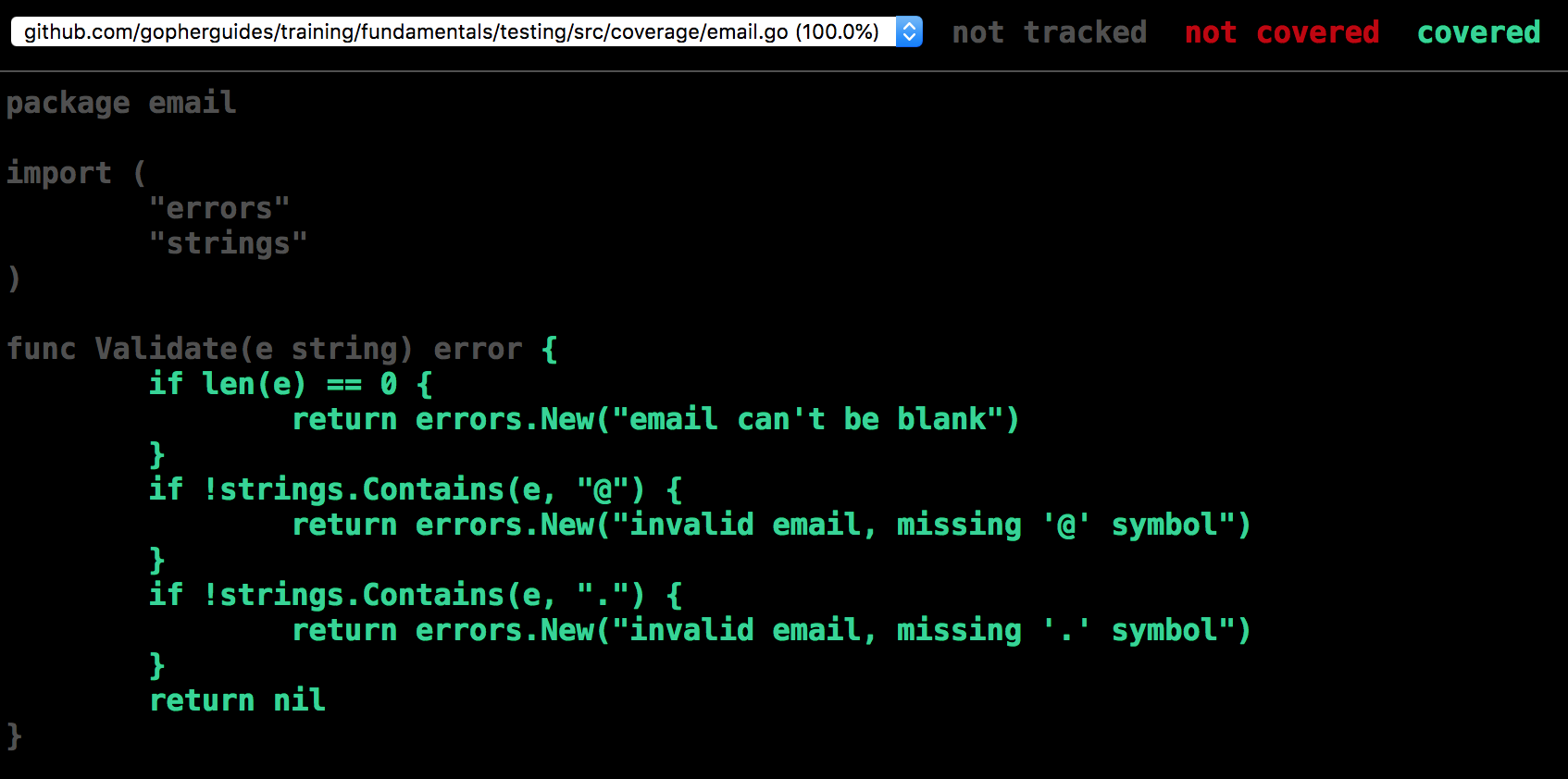
Go has built in tooling to generate code coverage
go test -coverprofile cover.out
go tool cover -html=cover.out
In Go 1.9, and below, coverage profiles can only be generated one package at a time. In 1.10, and above, multiple package coverage and aggregation can be enabled using ./....
Code Coverage For A Specific Test
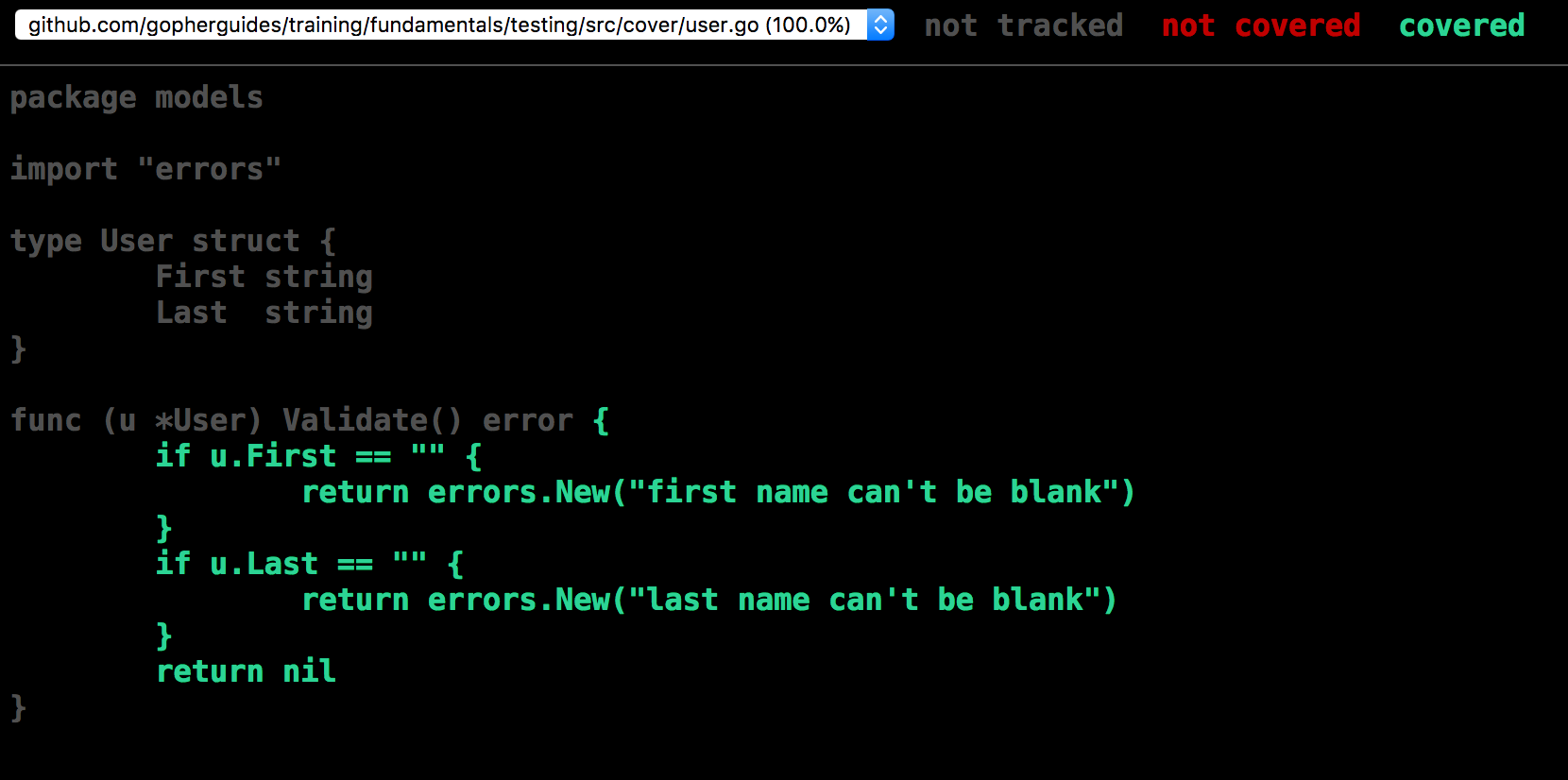
You can run code coverage just for a specific test:
go test -coverprofile cover.out -run TestUser_Validate
go tool cover -html=cover.out
GoConvey
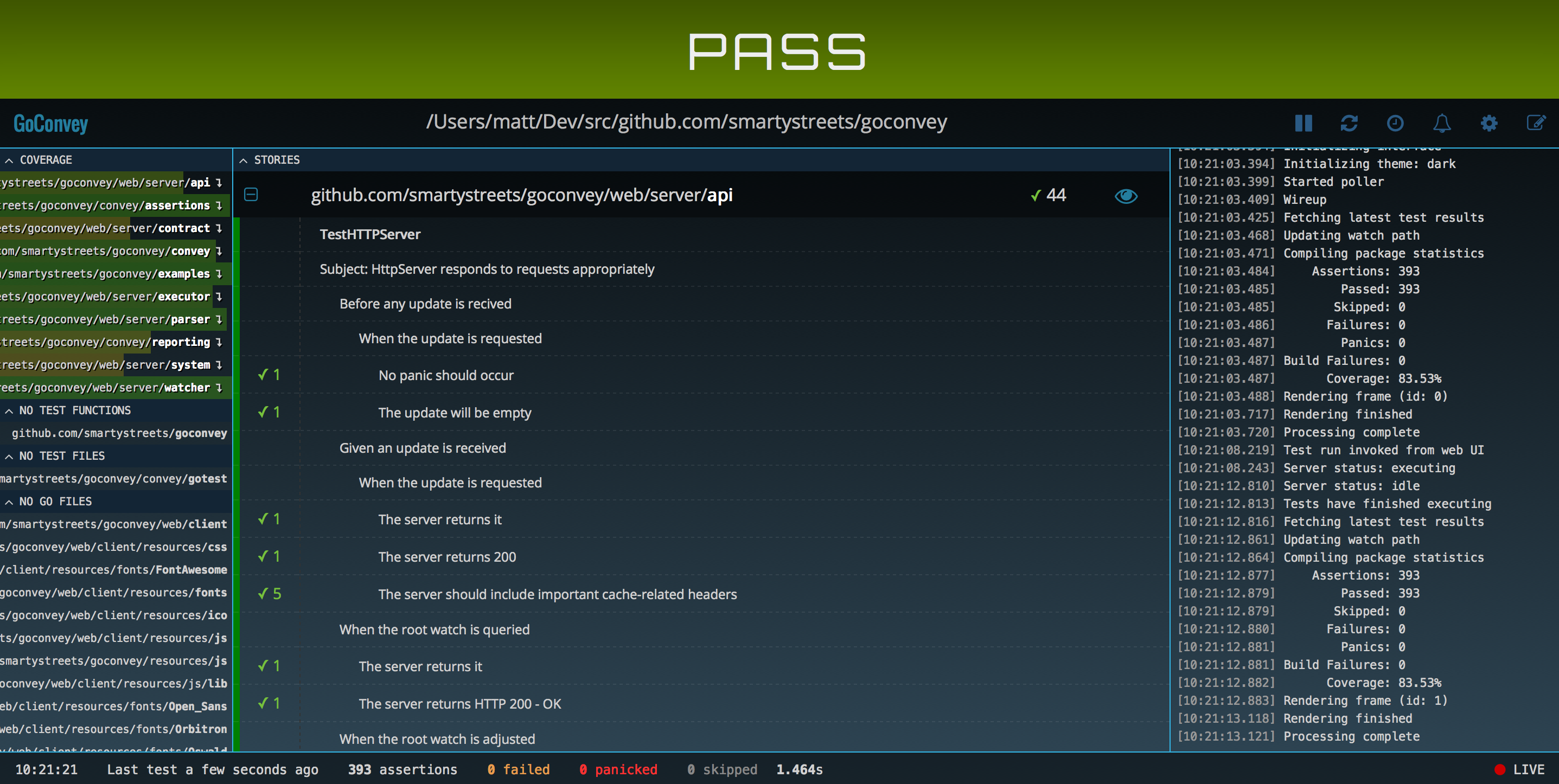
For smaller projects, GoConvey is a great tool.
go get github.com/smartystreets/goconvey
# from the project root run:
goconvey
GoConvey Features
- Directly integrates with go test
- Fully-automatic web UI (works with native Go tests, too)
- Huge suite of regression tests
- Shows test coverage (Go 1.2+)
- Readable, colorized console output (understandable by any manager, IT or not)
- Test code generator
- Desktop notifications (optional)
- Immediately open problem lines in Sublime Text (some assembly required)
GoConvey UI
Race Conditions
Race Conditions
Go is a concurrent language, and despite Go trying to make writing concurrent applications as simple as possible, it is still possible to run into a “race” condition.
A “race” condition is when a single piece of memory is trying to be accessed by multiple processes at the same time.
Race Conditions Example
Let’s look at this simple, yet contrived, example.
var m = 0

func inc() {
	m++
}package src_test
import (
"fmt"
"sync"
"testing"
)
var m = 0
func inc() {
m++
}
func TestRace(t *testing.T) {
	wg := &sync.WaitGroup{}
	for i := 0; i < 5; i++ {
		wg.Add(2)
		go func() {
			defer wg.Done()
			inc()
		}()
		go func() {
			defer wg.Done()
			fmt.Println(m)
		}()
	}
	wg.Wait()
	if m == 0 {
		t.Fatalf("expect m (%d) to not be zero", m)
	}
}Race Condition Test
This test uses goroutines to read and write from the m variable at the same
time.
func TestRace(t *testing.T) {
wg := &sync.WaitGroup{}
for i := 0; i < 5; i++ {
wg.Add(2)
go func() {
defer wg.Done()
inc()
}()
go func() {
defer wg.Done()
fmt.Println(m)
}()
}
wg.Wait()
if m == 0 {
t.Fatalf("expect m (%d) to not be zero", m)
}
}package src_test
import (
"fmt"
"sync"
"testing"
)
var m = 0
func inc() {
m++
}
func TestRace(t *testing.T) {
wg := &sync.WaitGroup{}
for i := 0; i < 5; i++ {
wg.Add(2)
go func() {
defer wg.Done()
inc()
}()
go func() {
defer wg.Done()
fmt.Println(m)
}()
}
wg.Wait()
if m == 0 {
t.Fatalf("expect m (%d) to not be zero", m)
}
}$ go test race_test.go
ok command-line-arguments 0.006s
Race Condition Detected
If we were to run this code, which passes the aforementioned test, we would get
a panic that looks something like the following:
Previous write at 0x0000012bb618 by goroutine 7:
  command-line-arguments.TestRace.func1()
      fundamentals/testing/src/race_test.go:21 +0x83

Goroutine 8 (running) created at:
  command-line-arguments.TestRace()
      fundamentals/testing/src/race_test.go:26 +0xd4
  testing.tRunner()
      /usr/local/go/src/testing/testing.go:657 +0x107
So how do we test for race conditions to make sure our code will work in a concurrent environment?
Testing Race Conditions
Using the -race flag when running tests will check for race conditions in our
code.
$ go test -race race_test.go

  ==================
  WARNING: DATA RACE
  Read at 0x0000012bb618 by goroutine 8:
    runtime.convT2E()
        /usr/local/go/src/runtime/iface.go:191 +0x0
    command-line-arguments.TestRace.func2()
        fundamentals/testing/src/race_test.go:25 +0x86

  Previous write at 0x0000012bb618 by goroutine 7:
    command-line-arguments.TestRace.func1()
        fundamentals/testing/src/race_test.go:21 +0x83
  --- FAIL: TestRace (0.00s)
    testing.go:610: race detected during execution of test
  FAIL
  FAIL  command-line-arguments  0.013s
The Race Flag
Using the -race flag will slow down your tests, so it is recommended to
always set it in your CI environment, and to run your tests locally with it
before committing code.
The race detector makes one promise: If it finds a race, it’s a race. It does NOT guarantee it will find ALL race conditions though.
Concurrency can get complicated, and this is another reason why it is important to keep your code simple and clean.
Benchmarks
Benchmarks
Go’s testing package includes built-in support for benchmarking. Benchmark functions help measure the performance of your code.
Benchmark functions must:
- Be in a
*_test.gofile - Start with
Benchmark - Accept a
*testing.Bparameter
Basic Benchmark
func BenchmarkStringConcat(b *testing.B) {
	for b.Loop() {
		s := ""
		for j := 0; j < 100; j++ {
			s += "a"
		}
	}
}
package src_test

import (
	"strings"
	"testing"
)

// section: basic
func BenchmarkStringConcat(b *testing.B) {
	for b.Loop() {
		s := ""
		for j := 0; j < 100; j++ {
			s += "a"
		}
	}
}

// section: basic

// section: loop
func BenchmarkStringBuilder_Loop(b *testing.B) {
	// Setup runs exactly once with B.Loop()
	parts := make([]string, 100)
	for i := range parts {
		parts[i] = "a"
	}

	// Use b.Loop() instead of for i := 0; i < b.N; i++
	for b.Loop() {
		var sb strings.Builder
		for _, p := range parts {
			sb.WriteString(p)
		}
		_ = sb.String()
	}
}

// section: loop

// section: compare
func BenchmarkStringJoin_Loop(b *testing.B) {
	parts := make([]string, 100)
	for i := range parts {
		parts[i] = "a"
	}

	for b.Loop() {
		_ = strings.Join(parts, "")
	}
}

// section: compareRun benchmarks with:
$ go test -bench=. ./...
Output from go test -bench=BenchmarkStringConcat -benchmem ./benchmark_test.go:
goos: darwin
goarch: arm64
cpu: Apple M1 Max
BenchmarkStringConcat-10    	  461296	      2652 ns/op	    5664 B/op	      99 allocs/op
PASS
ok command-line-arguments 1.431sgoos: darwin
goarch: arm64
cpu: Apple M1 Max
BenchmarkStringConcat-10 461296 2652 ns/op 5664 B/op 99 allocs/op
PASS
ok command-line-arguments 1.431sB.Loop() (Go 1.24+)
Go 1.24 introduced B.Loop() as the preferred way to write benchmark loops. It replaces the traditional for range b.N pattern.
Benefits of B.Loop():
- Executes setup code exactly once per
-countflag - Better prevention of compiler optimizations that could skew results
- Cleaner, more readable code
func BenchmarkStringBuilder_Loop(b *testing.B) {
	// Setup runs exactly once with B.Loop()
	parts := make([]string, 100)
	for i := range parts {
		parts[i] = "a"
	}

	// Use b.Loop() instead of for i := 0; i < b.N; i++
	for b.Loop() {
		var sb strings.Builder
		for _, p := range parts {
			sb.WriteString(p)
		}
		_ = sb.String()
	}
}
package src_test

import (
	"strings"
	"testing"
)

// section: basic
func BenchmarkStringConcat(b *testing.B) {
	for b.Loop() {
		s := ""
		for j := 0; j < 100; j++ {
			s += "a"
		}
	}
}

// section: basic

// section: loop
func BenchmarkStringBuilder_Loop(b *testing.B) {
	// Setup runs exactly once with B.Loop()
	parts := make([]string, 100)
	for i := range parts {
		parts[i] = "a"
	}

	// Use b.Loop() instead of for i := 0; i < b.N; i++
	for b.Loop() {
		var sb strings.Builder
		for _, p := range parts {
			sb.WriteString(p)
		}
		_ = sb.String()
	}
}

// section: loop

// section: compare
func BenchmarkStringJoin_Loop(b *testing.B) {
	parts := make([]string, 100)
	for i := range parts {
		parts[i] = "a"
	}

	for b.Loop() {
		_ = strings.Join(parts, "")
	}
}

// section: compareOutput from go test -bench=BenchmarkStringBuilder_Loop -benchmem ./benchmark_test.go:
goos: darwin
goarch: arm64
cpu: Apple M1 Max
BenchmarkStringBuilder_Loop-10    	 2082723	       566.2 ns/op	     248 B/op	       5 allocs/op
PASS
ok command-line-arguments 1.361sgoos: darwin
goarch: arm64
cpu: Apple M1 Max
BenchmarkStringBuilder_Loop-10 2082723 566.2 ns/op 248 B/op 5 allocs/op
PASS
ok command-line-arguments 1.361sTraditional Vs B.Loop() Pattern
Traditional (Pre-Go 1.24):
func BenchmarkOld(b *testing.B) {
	// Setup code runs for EACH b.N iteration adjustment
	data := setupExpensiveData()
	b.ResetTimer()
	for i := 0; i < b.N; i++ {
		processData(data)
	}
}
Modern (Go 1.24+):
func BenchmarkNew(b *testing.B) {
	// Setup code runs exactly once per -count
	data := setupExpensiveData()
	for b.Loop() {
		processData(data)
	}
}
With B.Loop(), you no longer need b.ResetTimer() for setup code because the setup runs exactly once.
Benchmark Memory Allocation
Use -benchmem to report memory allocations:
$ go test -bench=. -benchmem ./...
BenchmarkConcat-8    5000000    250 ns/op    64 B/op    2 allocs/op
Example Tests
Example Tests
Example tests are tests that document the use of your package. They are also runnable as tests to ensure that your examples are always error free.
package src_test

import (
	"fmt"

	"github.com/gopherguides/learn/_training/fundamentals/testing/src"
)

// This is some text from your example.
// You can add additional information about your example here.
func ExampleDuplicate() {
	d := src.Duplicate("foo")
	fmt.Println(d)
}package src_test
import (
"fmt"
"github.com/gopherguides/learn/_training/fundamentals/testing/src"
)
// This is some text from your example.
// You can add additional information about your example here.
func ExampleDuplicate() {
d := src.Duplicate("foo")
fmt.Println(d)
}Example Test Naming Conventions
- All examples must be in a
_test.gofile - All example functions must start with the word
Example - All example functions must take no argumentes and return no arguments
- Example functions must match a function or method in the package.
Example Test Validation
You can use the // Output: directive at the end of the test to
inspect the std out from the test and determine if the test was successful.
It will also show up as Output: in the generated go documentation.
package src_test

import (
	"fmt"

	"github.com/gopherguides/learn/_training/fundamentals/testing/src"
)

// This is some text from your example.
// You can add additional information about your example here.
func ExampleDuplicate() {
	d := src.Duplicate("foo")
	fmt.Println(d)
	// Output: foo foo
}package src_test
import (
"fmt"
"github.com/gopherguides/learn/_training/fundamentals/testing/src"
)
// This is some text from your example.
// You can add additional information about your example here.
func ExampleDuplicate() {
d := src.Duplicate("foo")
fmt.Println(d)
// Output: foo foo
}Example Documentation
This is what the output will look like in your generated go documentation.
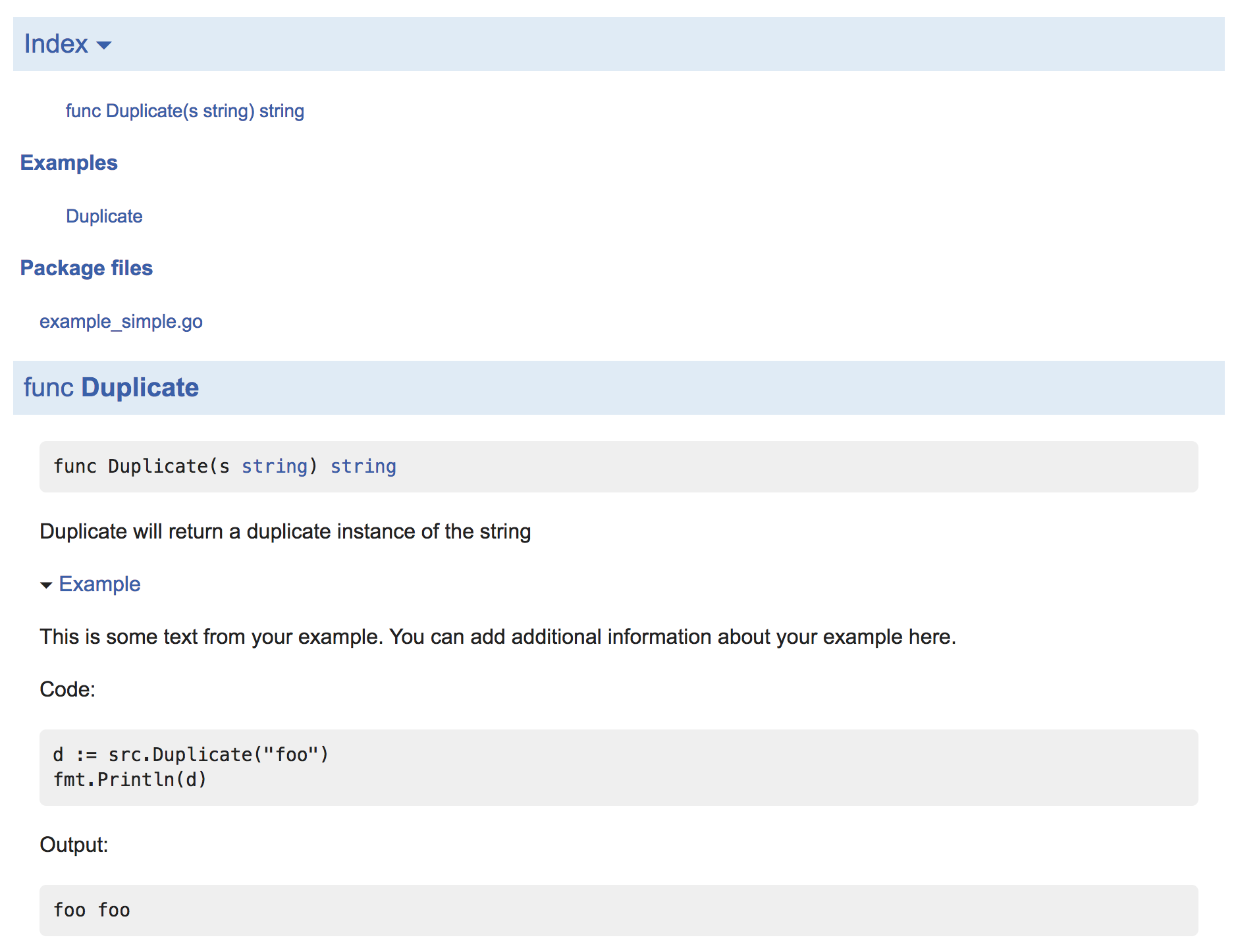
Some Lightweight Automation
Reflex and Watcher are small tools to watch a directory and rerun a command when certain files change. They are great for automatically running compile/lint/test tasks and for reloading your application when the code changes.
For example, running coverage for packages with this command:
Mac/Linux Scripts
reflex -- sh ~/coverage.sh
Contents of coverage.sh:
echo "creating coverage files"
go test -coverprofile=/tmp/coverage.out
go tool cover -html=/tmp/coverage.out -o /tmp/coverage.html
echo "coverage files created"echo "creating coverage files"
go test -coverprofile=/tmp/coverage.out
go tool cover -html=/tmp/coverage.out -o /tmp/coverage.html
echo "coverage files created"Launch livereload at the command line to monitor the /tmp/coverage.html file:
livereload /tmp/coverage.html
Windows Scripts
echo "creating coverage files"
if not exist "%TEMP%\coverage" mkdir %TEMP%\coverage
go test -coverprofile=%TEMP%\coverage\coverage.out
go tool cover -html=%TEMP%\coverage\\coverage.out -o %TEMP%\coverage\\coverage.html
echo "coverage files created"echo "creating coverage files"
if not exist "%TEMP%\coverage" mkdir %TEMP%\coverage
go test -coverprofile=%TEMP%\coverage\coverage.out
go tool cover -html=%TEMP%\coverage\\coverage.out -o %TEMP%\coverage\\coverage.html
echo "coverage files created"You will need to allow livereload access to your local network:
Then add the %TEMP%\coverage directory to livereload to monitor the changes.
Then launch watcher at the command prompt to create the coverage files any time you update your source code:
watcher -cmd="coverage.bat"
Here are the tools you need to put the automation together:
- Live Reload
- reflex - Used for Mac/Linux
- Watcher - Used for Windows
- Chrome Live Reload Extension
NOTE: If you are using the chrome extension, you have to enable local file access by enabling the following option: “Allow access to file URLs” checkbox in Tools > Extensions > LiveReload after installation.
Alternative Testing Packages
There are many alternative testing packages out there. Everything from simple assertion libraries, to clones of tools like RSpec.
A few suggestions are:
- https://github.com/stretchr/testify - the
require,assert, andsuitepackages are worth investigating - https://github.com/markbates/willie - simple HTTP testing library
- https://github.com/matryer/is - simple, 4 methods, assertion library
Testing Concurrent Code
The Testing/synctest Package (Go 1.25+)
Go 1.25 introduced the testing/synctest package for testing concurrent code with virtualized time. This solves a common problem: testing code that uses timers or delays without actually waiting.
The Problem With Time-Based Tests
Testing code that uses time.Sleep or timers is problematic:
// This test takes 5 real seconds to run!
func TestSlowOperation(t *testing.T) {
	done := make(chan bool)
	go func() {
		time.Sleep(5 * time.Second)
		done <- true
	}()
	<-done
}
Synctest.Test() Creates Isolated Bubbles
synctest.Test() creates an isolated “bubble” where time is virtualized:
func Test_Synctest_Basic(t *testing.T) {
	synctest.Test(t, func(t *testing.T) {
		start := time.Now()

		// This would normally take 5 seconds
		// but with synctest, it's instant!
		time.Sleep(5 * time.Second)

		elapsed := time.Since(start)

		// Inside the bubble, the fake clock shows 5 seconds passed
		if elapsed < 5*time.Second {
			t.Errorf("expected 5s elapsed, got %v", elapsed)
		}

		t.Logf("Fake time elapsed: %v", elapsed)
		t.Log("5 second sleep completed instantly!")
	})
}
package src_test

import (
	"testing"
	"testing/synctest"
	"time"
)

// section: basic
func Test_Synctest_Basic(t *testing.T) {
	synctest.Test(t, func(t *testing.T) {
		start := time.Now()

		// This would normally take 5 seconds
		// but with synctest, it's instant!
		time.Sleep(5 * time.Second)

		elapsed := time.Since(start)

		// Inside the bubble, the fake clock shows 5 seconds passed
		if elapsed < 5*time.Second {
			t.Errorf("expected 5s elapsed, got %v", elapsed)
		}

		t.Logf("Fake time elapsed: %v", elapsed)
		t.Log("5 second sleep completed instantly!")
	})
}

// section: basic

// section: wait
func Test_Synctest_Wait(t *testing.T) {
	synctest.Test(t, func(t *testing.T) {
		results := make(chan int, 3)

		// Start goroutines that sleep for different durations
		go func() {
			time.Sleep(1 * time.Second)
			results <- 1
		}()
		go func() {
			time.Sleep(2 * time.Second)
			results <- 2
		}()
		go func() {
			time.Sleep(3 * time.Second)
			results <- 3
		}()

		// Wait blocks until all goroutines are idle
		synctest.Wait()

		// All goroutines have completed their sleep
		// Collect results
		var got []int
		for i := 0; i < 3; i++ {
			got = append(got, <-results)
		}

		t.Logf("Results received in order: %v", got)
	})
}

// section: wait

// section: ticker
func Test_Synctest_Ticker(t *testing.T) {
	synctest.Test(t, func(t *testing.T) {
		ticker := time.NewTicker(100 * time.Millisecond)
		defer ticker.Stop()

		count := 0
		done := make(chan struct{})

		go func() {
			for range ticker.C {
				count++
				if count >= 5 {
					close(done)
					return
				}
			}
		}()

		// Wait for ticker to fire 5 times
		<-done

		if count != 5 {
			t.Errorf("expected 5 ticks, got %d", count)
		}

		// This would take 500ms in real time
		// but completes instantly with synctest
		t.Logf("Processed %d ticker events instantly!", count)
	})
}

// section: tickerOutput from go test -v -run Test_Synctest_Basic ./synctest_test.go:
=== RUN   Test_Synctest_Basic
    synctest_test.go:25: Fake time elapsed: 5s
    synctest_test.go:26: 5 second sleep completed instantly!
--- PASS: Test_Synctest_Basic (0.00s)
PASS
ok command-line-arguments 0.178s=== RUN Test_Synctest_Basic
synctest_test.go:25: Fake time elapsed: 5s
synctest_test.go:26: 5 second sleep completed instantly!
--- PASS: Test_Synctest_Basic (0.00s)
PASS
ok command-line-arguments 0.178sInside the bubble, time.Sleep doesn’t actually wait—time moves forward instantaneously when all goroutines are blocked.
Synctest.Wait()
synctest.Wait() blocks until all goroutines in the bubble are idle (blocked on channels, timers, etc.):
func Test_Synctest_Wait(t *testing.T) {
	synctest.Test(t, func(t *testing.T) {
		results := make(chan int, 3)

		// Start goroutines that sleep for different durations
		go func() {
			time.Sleep(1 * time.Second)
			results <- 1
		}()
		go func() {
			time.Sleep(2 * time.Second)
			results <- 2
		}()
		go func() {
			time.Sleep(3 * time.Second)
			results <- 3
		}()

		// Wait blocks until all goroutines are idle
		synctest.Wait()

		// All goroutines have completed their sleep
		// Collect results
		var got []int
		for i := 0; i < 3; i++ {
			got = append(got, <-results)
		}

		t.Logf("Results received in order: %v", got)
	})
}
package src_test

import (
	"testing"
	"testing/synctest"
	"time"
)

// section: basic
func Test_Synctest_Basic(t *testing.T) {
	synctest.Test(t, func(t *testing.T) {
		start := time.Now()

		// This would normally take 5 seconds
		// but with synctest, it's instant!
		time.Sleep(5 * time.Second)

		elapsed := time.Since(start)

		// Inside the bubble, the fake clock shows 5 seconds passed
		if elapsed < 5*time.Second {
			t.Errorf("expected 5s elapsed, got %v", elapsed)
		}

		t.Logf("Fake time elapsed: %v", elapsed)
		t.Log("5 second sleep completed instantly!")
	})
}

// section: basic

// section: wait
func Test_Synctest_Wait(t *testing.T) {
	synctest.Test(t, func(t *testing.T) {
		results := make(chan int, 3)

		// Start goroutines that sleep for different durations
		go func() {
			time.Sleep(1 * time.Second)
			results <- 1
		}()
		go func() {
			time.Sleep(2 * time.Second)
			results <- 2
		}()
		go func() {
			time.Sleep(3 * time.Second)
			results <- 3
		}()

		// Wait blocks until all goroutines are idle
		synctest.Wait()

		// All goroutines have completed their sleep
		// Collect results
		var got []int
		for i := 0; i < 3; i++ {
			got = append(got, <-results)
		}

		t.Logf("Results received in order: %v", got)
	})
}

// section: wait

// section: ticker
func Test_Synctest_Ticker(t *testing.T) {
	synctest.Test(t, func(t *testing.T) {
		ticker := time.NewTicker(100 * time.Millisecond)
		defer ticker.Stop()

		count := 0
		done := make(chan struct{})

		go func() {
			for range ticker.C {
				count++
				if count >= 5 {
					close(done)
					return
				}
			}
		}()

		// Wait for ticker to fire 5 times
		<-done

		if count != 5 {
			t.Errorf("expected 5 ticks, got %d", count)
		}

		// This would take 500ms in real time
		// but completes instantly with synctest
		t.Logf("Processed %d ticker events instantly!", count)
	})
}

// section: tickerOutput from go test -v -run Test_Synctest_Wait ./synctest_test.go:
=== RUN   Test_Synctest_Wait
    synctest_test.go:61: Results received in order: [1 2 3]
--- PASS: Test_Synctest_Wait (0.00s)
PASS
ok command-line-arguments 0.164s=== RUN Test_Synctest_Wait
synctest_test.go:61: Results received in order: [1 2 3]
--- PASS: Test_Synctest_Wait (0.00s)
PASS
ok command-line-arguments 0.164sThis is useful for testing that operations complete in the expected order.
Key Concepts
- Bubbles are isolated: Goroutines inside the bubble cannot communicate with goroutines outside
- Time is fake: All time operations (
time.Sleep,time.After, timers) use virtualized time - Instant advancement: Time advances immediately when all goroutines are blocked
- Wait for idle:
synctest.Wait()blocks until goroutines are suspended
When To Use Synctest
Use synctest when:
- Testing code with timeouts or delays
- Testing periodic operations (tickers, scheduled tasks)
- Verifying timing behavior without slow tests
- Testing context cancellation with deadlines
Not suitable for:
- Testing real I/O operations (network, disk)
- Testing code that doesn’t use the standard
timepackage
Test Attributes (Go 1.25+)
Go 1.25 added T.Attr() to emit structured key-value pairs to test output:
func Test_Attributes(t *testing.T) {
	// Emit structured key-value pairs to the test log
	t.Attr("test_type", "unit")
	t.Attr("component", "user-service")
	t.Attr("priority", "high")

	// Run the actual test
	result := processUser("test@example.com")
	if !result {
		t.Error("processUser failed")
	}

	t.Log("Test completed with attributes")
}
package src_test

import (
	"fmt"
	"testing"
)

// section: attr
func Test_Attributes(t *testing.T) {
	// Emit structured key-value pairs to the test log
	t.Attr("test_type", "unit")
	t.Attr("component", "user-service")
	t.Attr("priority", "high")

	// Run the actual test
	result := processUser("test@example.com")
	if !result {
		t.Error("processUser failed")
	}

	t.Log("Test completed with attributes")
}

// section: attr

// section: output-writer
func Test_Output(t *testing.T) {
	// Get an io.Writer that writes to the test log
	// without file:line annotations
	w := t.Output()

	// Write directly to test output
	fmt.Fprintln(w, "Custom output without annotations")
	fmt.Fprintf(w, "User count: %d\n", 42)

	t.Log("This line has the standard annotation")
}

// section: output-writer

// section: subtest-attr
func Test_SubtestAttributes(t *testing.T) {
	tests := []struct {
		name     string
		input    string
		expected bool
		priority string
	}{
		{"valid_email", "user@example.com", true, "high"},
		{"invalid_email", "not-an-email", false, "medium"},
	}

	for _, tc := range tests {
		t.Run(tc.name, func(t *testing.T) {
			// Each subtest can have its own attributes
			t.Attr("input", tc.input)
			t.Attr("priority", tc.priority)

			result := validateEmail(tc.input)
			if result != tc.expected {
				t.Errorf("validateEmail(%q) = %v, want %v",
					tc.input, result, tc.expected)
			}
		})
	}
}

// section: subtest-attr

// Helper functions for tests
func processUser(email string) bool {
	return email != ""
}

func validateEmail(email string) bool {
	// Simple validation for demo
	for _, c := range email {
		if c == '@' {
			return true
		}
	}
	return false
}Output from go test -v -run Test_Attributes ./attr_test.go:
=== RUN   Test_Attributes
=== ATTR  Test_Attributes test_type unit
=== ATTR  Test_Attributes component user-service
=== ATTR  Test_Attributes priority high
    attr_test.go:21: Test completed with attributes
--- PASS: Test_Attributes (0.00s)
PASS
ok command-line-arguments 0.166s=== RUN Test_Attributes
=== ATTR Test_Attributes test_type unit
=== ATTR Test_Attributes component user-service
=== ATTR Test_Attributes priority high
attr_test.go:21: Test completed with attributes
--- PASS: Test_Attributes (0.00s)
PASS
ok command-line-arguments 0.166sAttributes appear in test output and can be parsed by test analysis tools.
T.Output() Writer
The T.Output() method returns an io.Writer that writes to the test log without the standard test annotations (file:line prefixes):
func Test_Output(t *testing.T) {
	// Get an io.Writer that writes to the test log
	// without file:line annotations
	w := t.Output()

	// Write directly to test output
	fmt.Fprintln(w, "Custom output without annotations")
	fmt.Fprintf(w, "User count: %d\n", 42)

	t.Log("This line has the standard annotation")
}
package src_test

import (
	"fmt"
	"testing"
)

// section: attr
func Test_Attributes(t *testing.T) {
	// Emit structured key-value pairs to the test log
	t.Attr("test_type", "unit")
	t.Attr("component", "user-service")
	t.Attr("priority", "high")

	// Run the actual test
	result := processUser("test@example.com")
	if !result {
		t.Error("processUser failed")
	}

	t.Log("Test completed with attributes")
}

// section: attr

// section: output-writer
func Test_Output(t *testing.T) {
	// Get an io.Writer that writes to the test log
	// without file:line annotations
	w := t.Output()

	// Write directly to test output
	fmt.Fprintln(w, "Custom output without annotations")
	fmt.Fprintf(w, "User count: %d\n", 42)

	t.Log("This line has the standard annotation")
}

// section: output-writer

// section: subtest-attr
func Test_SubtestAttributes(t *testing.T) {
	tests := []struct {
		name     string
		input    string
		expected bool
		priority string
	}{
		{"valid_email", "user@example.com", true, "high"},
		{"invalid_email", "not-an-email", false, "medium"},
	}

	for _, tc := range tests {
		t.Run(tc.name, func(t *testing.T) {
			// Each subtest can have its own attributes
			t.Attr("input", tc.input)
			t.Attr("priority", tc.priority)

			result := validateEmail(tc.input)
			if result != tc.expected {
				t.Errorf("validateEmail(%q) = %v, want %v",
					tc.input, result, tc.expected)
			}
		})
	}
}

// section: subtest-attr

// Helper functions for tests
func processUser(email string) bool {
	return email != ""
}

func validateEmail(email string) bool {
	// Simple validation for demo
	for _, c := range email {
		if c == '@' {
			return true
		}
	}
	return false
}Output from go test -v -run Test_Output ./attr_test.go:
=== RUN   Test_Output
    Custom output without annotations
    User count: 42
    attr_test.go:36: This line has the standard annotation
--- PASS: Test_Output (0.00s)
PASS
ok command-line-arguments 0.170s=== RUN Test_Output
Custom output without annotations
User count: 42
attr_test.go:36: This line has the standard annotation
--- PASS: Test_Output (0.00s)
PASS
ok command-line-arguments 0.170sExercise - Test Coverage
- Given the following code and corresponding tests, generate code coverage
for the specific sub tests for testing for a
blank email. - Add additional tests to create 100% code coverage and re-generate the code covererage by running the entire test suite.
- Enable the sub tests to run in parallel.
Code File
package email

import (
	"errors"
	"strings"
)

func Validate(e string) error {
	if len(e) == 0 {
		return errors.New("email can't be blank")
	}
	if !strings.Contains(e, "@") {
		return errors.New("invalid email, missing '@' symbol")
	}
	if !strings.Contains(e, ".") {
		return errors.New("invalid email, missing '.' symbol")
	}
	return nil
}package email
import (
"errors"
"strings"
)
func Validate(e string) error {
if len(e) == 0 {
return errors.New("email can't be blank")
}
if !strings.Contains(e, "@") {
return errors.New("invalid email, missing '@' symbol")
}
if !strings.Contains(e, ".") {
return errors.New("invalid email, missing '.' symbol")
}
return nil
}Test File:
package email_test

import (
	"testing"

	email "github.com/gopherguides/learn/_training/fundamentals/testing/src/coverage"
)

func Test_ValidateEmail(t *testing.T) {
	t.Parallel()
	tests := []struct {
		name      string
		em        string
		expectErr bool
	}{
		{name: "blank", em: "", expectErr: true},
		{name: "at", em: "yahoo.com", expectErr: true},
	}

	for _, test := range tests {
		test := test
		t.Run(test.name, func(st *testing.T) {
			st.Parallel()
			err := email.Validate(test.em)
			if err == nil && test.expectErr {
				st.Fatal("expected error, got nil")
			}
			if err != nil && !test.expectErr {
				st.Fatal(err)
			}
		})
	}
}package email_test
import (
"testing"
email "github.com/gopherguides/learn/_training/fundamentals/testing/src/coverage"
)
func Test_ValidateEmail(t *testing.T) {
t.Parallel()
tests := []struct {
name string
em string
expectErr bool
}{
{name: "blank", em: "", expectErr: true},
{name: "at", em: "yahoo.com", expectErr: true},
}
for _, test := range tests {
test := test
t.Run(test.name, func(st *testing.T) {
st.Parallel()
err := email.Validate(test.em)
if err == nil && test.expectErr {
st.Fatal("expected error, got nil")
}
if err != nil && !test.expectErr {
st.Fatal(err)
}
})
}
}Solution - Test Coverage
Creating coverage for the blank scenario
go test ./... -run=Test_ValidateEmail/blank -coverprofile cover.out
go tool cover -html=cover.out
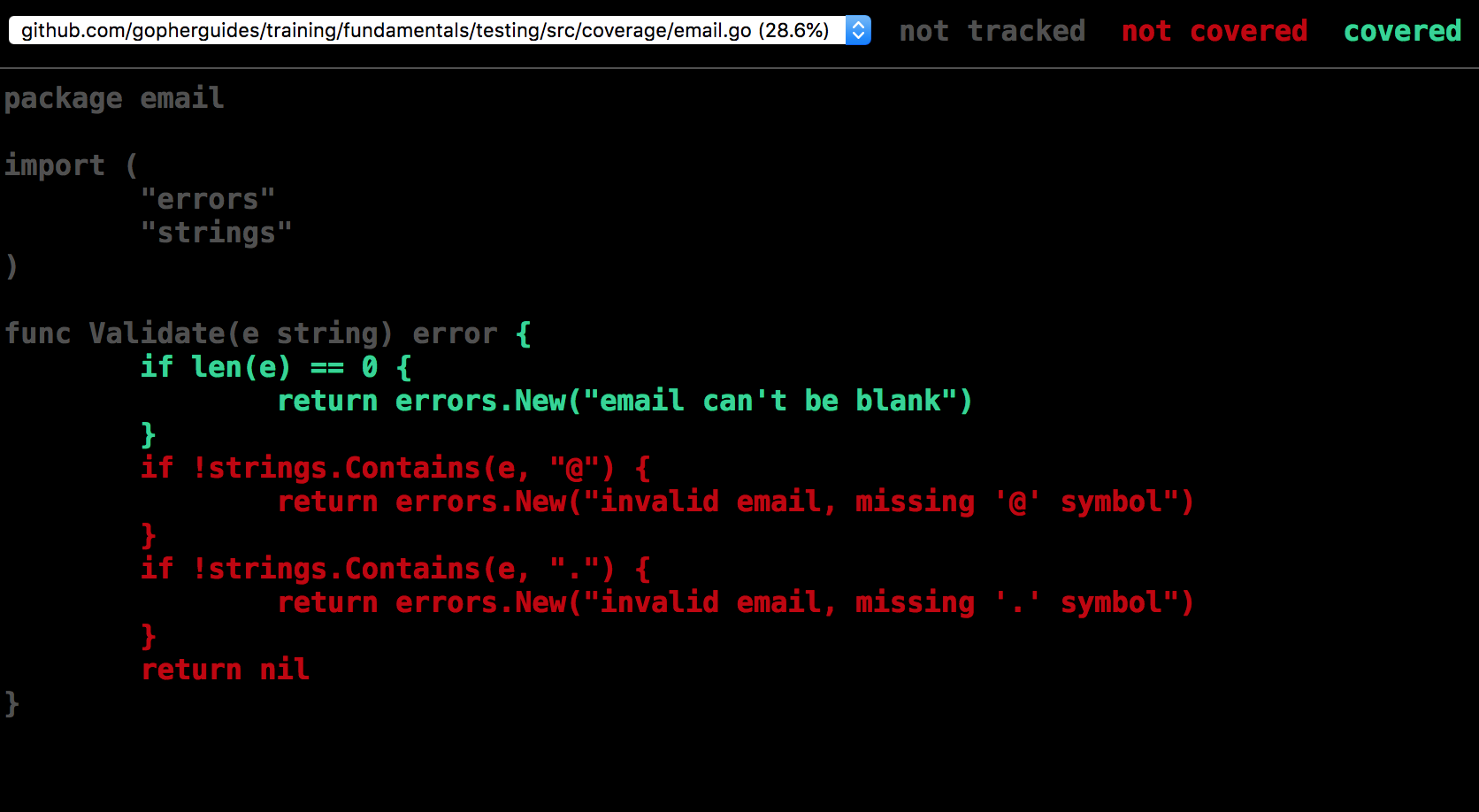
Here are the additional tests needed to create complete code coverage:
package email_test

import (
	"testing"

	email "github.com/gopherguides/learn/_training/fundamentals/testing/src/coverage"
)

func Test_ValidateEmail(t *testing.T) {
	tests := []struct {
		name      string
		em        string
		expectErr bool
	}{
		{name: "blank", em: "", expectErr: true},
		{name: "at", em: "yahoo.com", expectErr: true},
		{name: "period", em: "homer@yahoocom", expectErr: true},
		{name: "valid", em: "homer@yahoo.com"},
	}

	for _, test := range tests {
		t.Run(test.name, func(st *testing.T) {
			err := email.Validate(test.em)
			if err == nil && test.expectErr {
				st.Fatal("expected error, got nil")
			}
			if err != nil && !test.expectErr {
				st.Fatal(err)
			}
		})
	}
}package email_test
import (
"testing"
email "github.com/gopherguides/learn/_training/fundamentals/testing/src/coverage"
)
func Test_ValidateEmail(t *testing.T) {
tests := []struct {
name string
em string
expectErr bool
}{
{name: "blank", em: "", expectErr: true},
{name: "at", em: "yahoo.com", expectErr: true},
{name: "period", em: "homer@yahoocom", expectErr: true},
{name: "valid", em: "homer@yahoo.com"},
}
for _, test := range tests {
t.Run(test.name, func(st *testing.T) {
err := email.Validate(test.em)
if err == nil && test.expectErr {
st.Fatal("expected error, got nil")
}
if err != nil && !test.expectErr {
st.Fatal(err)
}
})
}
}Here is how to goenerate code coverage for the entire test:
go test ./... -coverprofile cover.out
go tool cover -html=cover.out